
The right audio mixer can make podcast recording easier by combining microphone inputs, headphone monitoring, level control, and computer connectivity in one setup. The best choice depends on your guest count, microphone type, workflow, and need for built-in effects.
We compare 10 options ranging from simple USB interfaces to fully featured podcast production consoles, helping you match your studio setup with the controls and connectivity you will actually use.
Best 10 Audio Mixer for Podcast Studio Picks for 2026
Feature-Rich Pick
MAONO AME2 Audio Interface Mixer

- XLR preamps with phantom power and up to 60dB gain
- 11 customizable sound pads with looping support
- Connections for instruments, computers, phones, and cameras
Best For: Podcasters and streamers who want effects, sound pads, and flexible connectivity
Premium All-in-One
RØDECaster Duo Production Studio
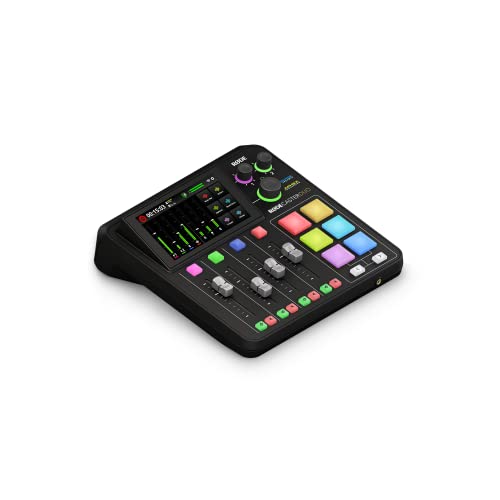
- Two combo inputs with 76dB Revolution Preamps
- Four faders, touchscreen, and six SMART pads
- APHEX processing with Aural Exciter and Big Bottom
Best For: Podcast studios needing integrated recording, streaming, and production controls
Flexible Analog Mixer

- 10 inputs with USB and SPX digital effects
- Class A D-PRE preamps with EQ and high-pass filters
- Rugged metal chassis for studio use
Best For: Studios needing multiple inputs and traditional hands-on mixing
Compact Recording Pick
Focusrite Scarlett Solo 3rd Gen

- One XLR mic preamp and one Hi-Z instrument input
- Air mode plus recording up to 24-bit/192kHz
- Compact design with included recording software
Best For: Solo podcasters and home studios recording one mic and one instrument
Best All-in-One Pick

- Four XLR inputs and headphone outputs
- APHEX voice processing presets
- Standalone and multitrack recording
Best For: Multi-mic podcasts and live production
Best Simple Streaming Mixer

- One XLR mic input with 48V phantom power
- Independent physical channel controls
- Custom effects, mute, and monitor buttons
Best For: Single-mic streaming and beginner setups
Best Portable Two-Mic Option

- Two XLR inputs with up to 60dB gain
- Eight customizable sound-effect buttons
- Built-in battery rated for up to 8 hours
Best For: Co-hosted and mobile podcast recording
Compact Streaming Control

- Four individual control channels
- XLR input with 48V phantom power
- Mute, monitoring, RGB, and voice effects
Best For: Compact podcasting and live-streaming desks
All-in-One Creator Bundle
Podcast Equipment Studio Package

- Includes two microphones and suspension arms
- USB-C connectivity across major platforms
- Voice effects and instrument input support
Best For: New podcasters and multi-person content creators
Flexible Four-Channel Mixer

- Four channels with XLR, line, RCA, and AUX inputs
- USB-C PC recording and headphone monitoring
- 48V phantom power and 99 DSP effects
Best For: Small studios needing varied connections and processing
Feature-Rich Pick – MAONO AME2 Audio Interface Mixer
The MAONO AME2 is a versatile audio mixer for podcast studio setups that need multiple inputs, customizable sound effects, and live-streaming connections. Its XLR preamps, USB-C connectivity, sound pads, and instrument input make it suitable for podcasts, voice-overs, streaming, and content creation.
Best For: Creators who want built-in sound pads, vocal effects, and support for microphones, instruments, smartphones, and computers.
Pros:
- Two XLR microphone inputs with up to 60dB gain, 48V phantom power, and noise reduction.
- Eleven customizable sound pads, including looping and longer audio recording options.
- Supports guitar, bass, live streaming, loopback, reverb, auto-tune, and tone controls.
- Works with PC, Mac, smartphones, tablets, and cameras.
Cons:
- USB microphones are not supported.
- Its many controls and effects may require time to learn.
The AME2 is a strong choice when hands-on podcast production and streaming features matter more than a minimalist interface. It offers broad connectivity and creative tools in a compact console.
Premium All-in-One – RØDECaster Duo Production Studio
The RØDECaster Duo is a premium audio mixer for podcast studio workflows that combine recording, streaming, music production, and content creation. It pairs two combo inputs and high-gain preamps with physical faders, a touchscreen, SMART pads, and studio-grade processing.
Best For: Podcasters and content teams seeking an integrated production console with strong processing and tactile controls.
Pros:
- Two Neutrik combo inputs with Revolution Preamps offering up to 76dB of gain.
- Four broadcast-quality faders and a high-resolution touchscreen with haptic feedback.
- Six SMART pads with bank switching for production functions and sound triggers.
- Includes APHEX processing, Aural Exciter, and Big Bottom effects.
Cons:
- Provides four channels, which may be limiting for larger multi-person setups.
- More expensive and feature-dense than a basic audio interface.
The RØDECaster Duo makes the most sense for users who want a dedicated control surface and advanced processing without assembling several separate pieces of podcast equipment.
Flexible Analog Mixer – YAMAHA MG10XU 10-Input Mixer
The YAMAHA MG10XU is a practical audio mixer for podcast studio setups that need up to 10 inputs, USB connectivity, and hands-on mixing controls. Its discrete Class A D-PRE preamps, three-band EQ, high-pass filters, compressors, and SPX effects provide useful control for voices and instruments.
Best For: Studios that prefer a traditional mixer layout for combining several microphones, instruments, or stereo sources.
Pros:
- Ten-input design offers more routing capacity than compact two-input interfaces.
- Class A D-PRE preamps are designed for natural bass and smooth highs.
- Three-band EQ, high-pass filters, one-knob compressors, and SPX digital effects.
- Rugged powder-coated metal chassis is built for regular handling.
Cons:
- Its traditional mixer format is less specialized for podcast sound pads and live-stream effects.
- It is larger and heavier than compact interfaces such as the Scarlett Solo.
The MG10XU is a good fit when input count and physical mixing control are priorities. It is especially useful for a studio that may expand beyond a simple single-microphone podcast arrangement.
Compact Recording Pick – Focusrite Scarlett Solo 3rd Gen
The Focusrite Scarlett Solo 3rd Gen is a compact audio mixer for podcast studio beginners who need a straightforward way to record one microphone and one instrument. It offers a mic preamp with switchable Air mode, a high-headroom instrument input, low-noise monitor outputs, and recording up to 24-bit/192kHz.
Best For: Solo podcasters, musicians, and home studios recording a voice microphone alongside a guitar or bass.
Pros:
- One XLR mic preamp and one Hi-Z instrument input in a small interface.
- Air mode can add clarity to acoustic instruments and vocal recordings.
- 24-bit/192kHz converters support high-resolution recording and mixing.
- Includes recording software, instruments, effects, and mastering tools.
Cons:
- Only two channels, limiting multi-person podcast recordings.
- It lacks dedicated mixer features such as sound pads and built-in podcast effects.
The Scarlett Solo is best when simplicity, portability, and clean recording are more important than extensive routing. Its single mic input makes it a natural fit for solo shows and basic voice-and-instrument sessions.
Best All-in-One Pick – RØDECaster Pro II
If you want an audio mixer for podcast studio use without assembling multiple pieces, the RØDECaster Pro II combines four XLR inputs, headphone outputs, voice processing, sound pads, and recording options in one desk unit. It can record to a computer, microSD card, or USB drive, and it can operate standalone.
Best For: Podcasters and streamers who want a capable, self-contained studio console for multiple microphones and live production.
Pros:
- Four XLR microphone inputs with four studio preamps.
- APHEX processing presets help make voices broadcast-ready with one tap.
- Records multitrack audio to a computer, microSD card, or USB drive.
- Eight customizable SMART pads support music, effects, and mix-minus calls.
Cons:
- Its broader feature set may be more than a basic one-microphone setup needs.
- Microphones are not included.
The RØDECaster Pro II is the most complete choice here for a dedicated podcast studio, particularly when standalone recording and hands-on show control matter.
Best Simple Streaming Mixer – FIFINE Ampligame SC3
The FIFINE Ampligame SC3 is an audio mixer for podcast studio beginners who need straightforward control over one microphone, headphones, computer audio, and line-level devices. Its physical fader, mute and monitor buttons, effects, and plug-and-play Mac and Windows support suit compact streaming or recording setups.
Best For: Single-mic streamers and beginner creators who want accessible controls for voice, game, music, and chat audio.
Pros:
- XLR microphone input includes 48V phantom power for compatible condenser microphones.
- Independent controls manage microphone, line-in, headphone, and line-out levels.
- Four customizable sound-effect buttons, six voice-changing modes, and auto-tune effects add creative options.
- Front-facing mute and monitor buttons are easy to reach during a broadcast.
Cons:
- It is designed for one microphone rather than a multi-host podcast.
- It does not support USB microphones.
- An XLR cable is not included.
The SC3 keeps live audio adjustments simple and tactile, though its one-mic design makes it better suited to solo creators than a traditional multi-person podcast studio.
Best Portable Two-Mic Option – MAONO E2 Gen2
The MAONO E2 Gen2 is an audio mixer for podcast studio setups that need two XLR microphones, flexible phone and computer connections, and built-in creative controls. Its 60dB preamps are intended for clean dynamic-microphone gain, while USB-C, Bluetooth, AUX, and loopback features support recording and streaming workflows.
Best For: Co-hosted podcasts and mobile creators who want two-mic recording, sound effects, and battery-powered operation.
Pros:
- Two XLR combo inputs and low-noise preamps provide up to 60dB of gain.
- Eight customizable sound-effect buttons support clips up to 20 seconds each.
- USB-C, 3.5mm, Bluetooth, and AUX connections accommodate computers, phones, tablets, and instruments.
- Built-in 1500mA battery provides up to eight hours of use.
Cons:
- The supplied notes do not indicate that microphones are included.
- Its many voice, reverb, and routing features may take time to learn.
With two microphone inputs and a built-in battery, the E2 Gen2 is a flexible fit for co-hosts and creators who want to move between a desk, computer, and mobile recording setup.
Compact Streaming Control – FIFINE Ampligame SC3W
The FIFINE Ampligame SC3W is a compact audio mixer for podcast studio setups that need simple hands-on control. Its four-channel layout, XLR input, 48V phantom power, mute control, and real-time monitoring support podcasting, recording, and live streaming.
Best For: Solo creators and streamers who want a compact mixer with microphone control, monitoring, and entertainment features.
Pros:
- Four individual control channels for adjusting connected devices.
- XLR microphone input with built-in 48V phantom power for compatible condenser microphones.
- USB plug-and-play connectivity, mute control, and real-time monitoring.
- Supports dual-PC setups and includes RGB lighting, voice changing, and customizable sound buttons.
Cons:
- Its 3.5mm output and four-channel design may be limiting for larger studio systems.
- Some entertainment features are more relevant to gaming and live streaming than traditional recording.
Choose this model when convenient controls and streaming-oriented features matter more than extensive routing or a large channel count. Its small footprint also suits compact desks.
All-in-One Creator Bundle – Podcast Equipment Studio Package
This podcast equipment bundle combines a two-channel audio interface with two condenser microphones, suspension arms, voice effects, and USB-C connectivity. For an audio mixer for podcast studio use, it is aimed at creators who want a ready-to-use package for recording, streaming, and video content.
Best For: New or multi-person creators who need microphones, mounting hardware, vocal effects, and broad device compatibility in one package.
Pros:
- Includes two condenser microphones with anti-vibration suspension arms.
- USB-C plug-and-play connections support PCs, smartphones, iPads, and multiple operating systems.
- Offers four voice variations and 10 sound effects for live content.
- Accepts instrument inputs including electric guitar, bass, and electronic drums.
Cons:
- The listed two-channel configuration is less expandable than a larger studio mixer.
- Battery charging is required before initial use or after extended storage.
- Driver support may require contacting the manufacturer if automatic installation does not start.
This is a practical starting point for creators who value included hardware and effects. Consider a more traditional mixer if your priority is extensive channel routing and detailed physical controls.
Flexible Four-Channel Mixer – Aveek F4 Audio Mixer
The Aveek F4 is a flexible audio mixer for podcast studio workflows that need multiple input types, wired recording, and monitoring. It provides four channels, two microphone/line inputs, 48V phantom power, USB-C PC recording, Bluetooth playback, and dedicated tone controls.
Best For: Podcasters and small recording setups that need multiple connections, headphone monitoring, and built-in processing.
Pros:
- Four-channel design with XLR, 6.35mm, RCA, and auxiliary connections.
- Built-in PC recording chip enables USB-C plug-and-play recording and playback.
- Independent 48V phantom power supports compatible condenser microphones.
- Includes Bluetooth playback, USB drive recording, 3-band EQ, and 99 DSP effects.
Cons:
- Bluetooth is intended for playback and cannot connect an output device.
- It weighs 1.3 kg and is larger than a compact desktop mixer.
- Its many effects and connection options may require more setup than a basic podcast interface.
For a small studio that needs flexible analog connections and onboard processing, the F4 offers a broad feature set. Its recording, monitoring, and phantom-power options make it especially versatile for mixed podcast and music use.
How We Picked the Best Audio Mixer for Podcast Studio Use
We evaluated these mixers and interfaces by looking at the features that matter most in podcast production: microphone connectivity, preamp control, headphone monitoring, USB recording, routing flexibility, portability, and ease of use. We also considered whether each model suits solo recording, co-hosted shows, remote guests, live streaming, or more advanced multi-source production.
Not every product is a traditional mixer. Some are USB audio interfaces designed for straightforward computer recording, while others are dedicated podcast consoles with pads, effects, mix-minus functions, and onboard workflow tools. That distinction is important when choosing an Audio Mixer for Podcast Studio use.
Quick Comparison
| Best For | Look For | Product Types |
|---|---|---|
| Solo podcasts | One quality mic input, simple USB connection | Compact audio interfaces |
| Two-person shows | Multiple XLR inputs and independent headphone control | Podcast mixers and small consoles |
| Remote interviews | Mix-minus, Bluetooth, or phone/computer routing | Dedicated production studios |
| Live streaming | Quick mute controls, sound pads, and real-time effects | Streaming and gaming mixers |
| Budget setups | Basic USB recording and accessible controls | Entry-level mixers and bundles |
Key Buying Factors for an Audio Mixer for Podcast Studio
Inputs and Microphone Compatibility
Count how many people will speak at the same time and check the connector type. XLR inputs are the standard for dynamic and condenser podcast microphones. If you plan to add guests, choose more inputs than you currently need. Also confirm that the mixer supplies phantom power if you use condenser microphones.
USB Recording and Computer Support
USB connectivity lets you record directly into podcast software. Check whether the device sends a stereo mix or separate channels to the computer. Multitrack output offers more editing control, while a simple stereo feed is easier for beginners and live broadcasts.
Monitoring and Routing
Independent headphone outputs are useful for co-hosts and guests. Look for clear level controls, low-latency monitoring, and practical routing options. Mix-minus support can prevent remote callers from hearing their own delayed audio.
Controls, Effects, and Workflow
Dedicated mute buttons, programmable pads, EQ, compression, reverb, and voice effects can speed up production, but they also add cost and complexity. Buy these features only if they fit your recording or streaming routine.
Portability and Power
A compact interface may be best for mobile recording, while a larger console can provide easier hands-on control in a permanent studio. Verify power requirements, included cables, and operating-system compatibility before buying.
Who Should Buy Which Audio Mixer for Podcast Studio?
Solo creators: Choose a compact USB interface when you need clean microphone input and uncomplicated recording. Two-person podcasts: Prioritize multiple XLR inputs, headphone outputs, and independent level control. Interview and live-production hosts: A dedicated podcast production studio is worth considering for routing, sound pads, and remote-call features. Streamers and gamers: A gaming-focused mixer can provide fast control over voice, game audio, and effects. First-time buyers: A bundle may offer a convenient starting point, but inspect the microphone quality and upgrade path rather than choosing solely by included accessories.
Before ordering, confirm the number of inputs, required connections, software compatibility, and whether the mixer supports your microphone type. The best Audio Mixer for Podcast Studio recording is the one that matches your current workflow while leaving enough room for the guests, sources, and production features you plan to add next.