
The best audio interface can make home recording cleaner, simpler, and more reliable by connecting microphones and instruments to your computer with better preamps, monitoring, and latency control.
This roundup compares 10 popular USB models, from compact one-input interfaces for solo creators to flexible four-input options for bands, podcasts, and MIDI setups.
Best 10 Audio Interface Picks for 2026
Best Compact Starter
Focusrite Scarlett Solo 3rd Gen

- One mic and one instrument input
- Air mode and 24-bit/192kHz recording
- Includes useful music software
Best For: Solo musicians, vocalists, and podcasters
Best Vintage-Style Sound
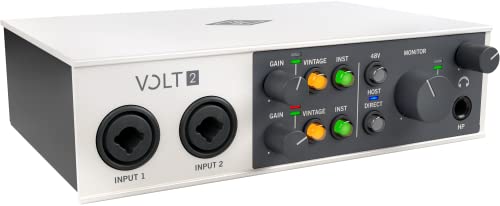
- Vintage mode emulates classic 610 preamps
- 24-bit/192kHz recording and mixing
- Includes MIDI and mobile support
Best For: Musicians, podcasters, and streamers wanting preamp character
Best for Easy Level Setting
Focusrite Scarlett 2i2 4th Gen

- Two mic and two Hi-Z instrument inputs
- Auto Gain and Clip Safe reduce clipping risk
- 120dB dynamic range with 24-bit/192kHz support
Best For: Home producers and small two-source recording setups
Best for Multiple Inputs

- Four inputs and four outputs
- Four Midas preamps with phantom power
- Includes MIDI I/O and 24-bit/192kHz audio
Best For: Small ensembles and multi-microphone recording
Best Overall
Focusrite Scarlett Solo 4th Gen

- 24-bit/192kHz recording with 120dB dynamic range
- Air mode for added vocal and guitar presence
- Includes several recording software and plugin tools
Best For: Solo songwriters recording vocals and guitar
Best for Vintage Preamp Tone
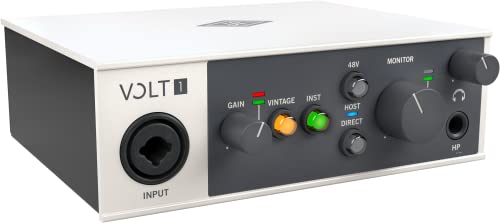
- Vintage mode emulates classic 610 preamp character
- Supports up to 24-bit/192kHz recording
- Compatible with computers and supported iOS devices
Best For: Creators wanting preamp character and mobile flexibility
Best Budget Flexibility
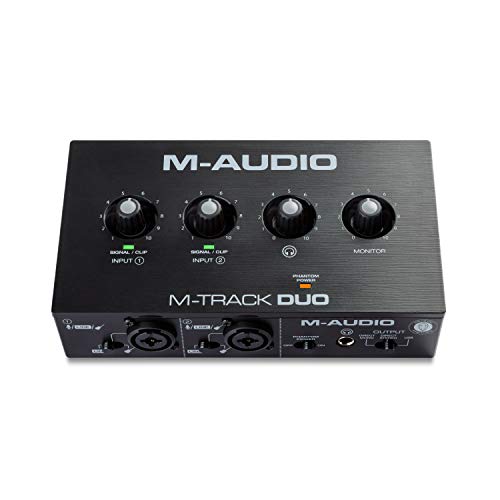
- Two combo XLR/line/instrument inputs
- Phantom power and zero-latency direct monitoring
- Includes MPC Beats for recording and production
Best For: Podcasters, streamers, and musicians on a budget
Budget Studio Starter

- Midas-designed mic preamp
- Two inputs with direct monitoring
- USB-powered and DAW compatible
Best For: Solo musicians recording vocals and instruments
Portable Recording Value
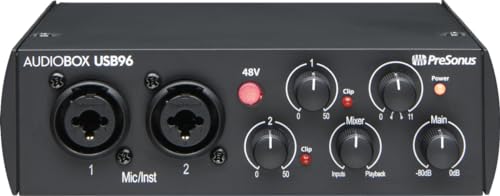
- Two Class-A mic preamps
- 24-bit/96 kHz recording support
- Includes recording software bundle
Best For: Home recording with MIDI and bundled production tools
Streaming-Friendly Compact Pick
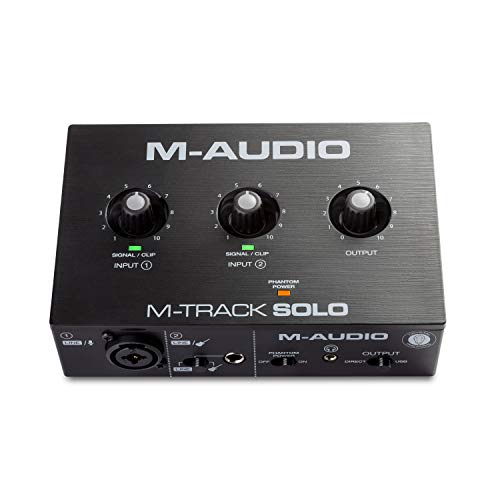
- Mic, line, and instrument inputs
- Zero-latency USB/direct monitoring
- Includes MPC Beats software
Best For: Podcasting, streaming, and simple mobile recording
Best Compact Starter – Focusrite Scarlett Solo 3rd Gen
The Focusrite Scarlett Solo 3rd Gen is a compact audio interface for recording one microphone and one guitar or bass at a time. Its Air mode, 24-bit/192kHz recording, and low-noise outputs make it a practical choice for music, vocals, and podcasts.
Best For: Solo musicians, vocalists, podcasters, and home studios needing a simple two-channel setup.
Pros:
- One mic preamp and one high-headroom Hi-Z instrument input
- Air mode adds clarity to acoustic instruments and recordings
- Supports recording and mixing up to 24-bit/192kHz
- Includes several recording tools and software bundles
Cons:
- Only supports one microphone input at a time
- Less suitable for recording multiple performers simultaneously
Choose the Solo if you value a straightforward workflow and compact footprint. It offers strong core recording specifications, but users who need two microphones or more simultaneous inputs should consider a larger interface.
Best Vintage-Style Sound – Universal Audio Volt 2
The Universal Audio Volt 2 is a two-channel audio interface designed for musicians, podcasters, and streamers who want a more characterful recording option. Its Vintage mode emulates the sound of classic 610-style preamps while retaining 24-bit/192kHz conversion.
Best For: Creators who want vintage-inspired preamp character, MIDI connectivity, and flexible computer or mobile recording.
Pros:
- Vintage mode provides 610 tube-preamp-style coloration
- Records and mixes at up to 24-bit/192kHz quality
- Includes MIDI connectivity for compatible setups
- Supports Mac, Windows, iPad, and iPhone recording
Cons:
- Mobile iOS use may require an external power supply and adapter
- One-year manufacturer warranty is shorter than some alternatives
The Volt 2 stands out when preamp character and mobile flexibility matter. It is a strong fit for two-channel recording, while users seeking a completely transparent interface may prefer a model without a dedicated vintage-emulation mode.
Best for Easy Level Setting – Focusrite Scarlett 2i2 4th Gen
The Focusrite Scarlett 2i2 4th Gen is a versatile two-channel audio interface with two microphone preamps and two Hi-Z instrument inputs. Auto Gain and Clip Safe help manage recording levels, making it useful when you want to spend less time troubleshooting clipping.
Best For: Home producers, singer-songwriters, and small recording setups using two microphones, instruments, or a combination of both.
Pros:
- Two mic preamps and two Hi-Z instrument inputs
- 120dB dynamic range and recording up to 24-bit/192kHz
- Auto Gain and Clip Safe help protect takes from poor levels
- Air mode adds presence and harmonic drive
Cons:
- Limited to two input channels
- Heavier and larger than the Scarlett Solo 3rd Gen
The 2i2 4th Gen is the more flexible pick for recording two sources at once and offers useful level-management features for newer users. It remains a compact desktop interface, but larger ensembles will need more inputs.
Best for Multiple Inputs – Behringer U-PHORIA UMC404HD
The Behringer U-PHORIA UMC404HD is a 4×4 USB audio interface for recording several microphones or instruments at once. Four Midas-designed mic preamps, MIDI I/O, phantom power, and a metal chassis give it a practical feature set for larger home-recording sessions.
Best For: Small ensembles, multi-microphone recording, and users who need four inputs and four outputs with MIDI.
Pros:
- Four inputs and four outputs for expanded routing
- Four Midas-designed mic preamps with +48V phantom power
- 24-bit/192kHz resolution and ultra-low-latency operation
- Includes MIDI input and output
Cons:
- Larger and heavier than compact two-channel interfaces
- Supplied operating-system details list Windows compatibility rather than current macOS support
The UMC404HD makes the most sense when input count is the priority. Its four-channel layout is better suited to simultaneous recording than the smaller options, though its larger chassis may be excessive for a single vocalist or guitarist.
Best Overall – Focusrite Scarlett Solo 4th Gen
The Focusrite Scarlett Solo 4th Gen is a streamlined audio interface for recording a microphone and guitar or another instrument. Its 24-bit/192kHz operation, 120dB dynamic range, and USB-C connectivity make it a strong fit for home recording, while Air mode can add presence to vocals and guitars.
Best For: Songwriters and solo musicians recording vocals and guitar.
Pros:
- One XLR mic preamp and one Hi-Z instrument input cover common solo recording setups.
- Supports up to 24-bit/192kHz audio with a 120dB dynamic range.
- Includes Air modes plus Pro Tools Intro+, Ableton Live Lite, Cubase LE, and Hitmaker Expansion.
- Compatible with Mac, Windows, and iPad.
Cons:
- Its two-input layout is geared toward solo recording rather than larger sessions.
- The supplied notes list one microphone input and one instrument input, limiting simultaneous source variety.
Choose the Scarlett Solo when sound quality, simple operation, and a useful software bundle matter more than having multiple mic inputs. It is a particularly practical audio interface for a compact songwriting setup.
Best for Vintage Preamp Tone – Universal Audio Volt 1
The Universal Audio Volt 1 is an audio interface for creators who want a more characterful recording option. Its Vintage mode is designed to deliver the rich sound of UA’s classic 610 preamps, while 24-bit/192kHz recording and broad computer and mobile compatibility support flexible workflows.
Best For: Musicians and creators seeking Vintage-mode preamp character and mobile recording support.
Pros:
- Vintage mode is designed to provide classic 610-style preamp tone.
- Records at up to 24-bit/192kHz with crystal-clear converters.
- Works with MacOS, Windows, iPad, and iPhone running iOS 14 or later.
- Includes access to LUNA and UAD plug-ins and instruments, along with recording tutorials.
Cons:
- Mobile use may require an Apple Lightning to USB Camera Adapter for compatible iPhones and Lightning-equipped iPads.
- Requires an external Volt power supply.
The Volt 1 stands out for its Vintage mode and UA-centered software ecosystem. It is worth considering if preamp flavor and a supported learning and production workflow are priorities.
Best Budget Flexibility – M-AUDIO M-Track Duo
The M-AUDIO M-Track Duo is a versatile audio interface for podcasting, recording, and live streaming on a Mac or PC. It provides two combo XLR/line/instrument inputs, phantom power for condenser microphones, and direct monitoring for zero-latency listening.
Best For: Budget-conscious podcasters, streamers, and musicians needing two flexible inputs.
Pros:
- Two combo inputs accept microphone, line, or instrument signals.
- Phantom power supports condenser microphones.
- USB/Direct monitoring switch enables zero-latency monitoring.
- Includes MPC Beats and supports Mac, PC, Android, and iOS setups.
Cons:
- Maximum sample rate is 48kHz, lower than the other listed interfaces.
- Its stated audio resolution is aimed at practical recording rather than high-resolution 192kHz work.
The M-Track Duo is a sensible choice when input flexibility and monitoring features are more important than maximum sample rate. Its dual combo inputs also make it adaptable for two microphones, instruments, or line-level sources.
Budget Studio Starter – Behringer UMC22
The Behringer UMC22 is a compact two-channel audio interface for solo musicians who want a straightforward way to record microphones and instruments on a Mac or Windows computer. Its Midas-designed mic preamp, USB bus power, direct monitoring, and broad DAW compatibility make it practical for basic home recording.
Best For: Solo musicians recording vocals, instruments, and ideas at home or on the go.
Pros:
- Midas-designed mic preamp for high-quality audio reproduction.
- Combination XLR/TRS/TS input plus a dedicated instrument input.
- Direct monitoring, headphone output, phantom power, and monitor outputs.
- Works with popular software including Pro Tools, Ableton Live, and Cubase.
Cons:
- Two-channel design is best suited to smaller recording setups.
- USB-supplied power may be less flexible than an interface with a separate power supply.
The UMC22 focuses on essential recording and monitoring features in an ultra-compact package. It is a sensible choice when you need a simple audio interface for a microphone-and-instrument workflow rather than a larger studio system.
Portable Recording Value – PreSonus AudioBox 96
The PreSonus AudioBox 96 is a two-channel audio interface designed for personal and portable recording. It combines two Class-A mic preamps, instrument inputs, MIDI I/O, 24-bit/96 kHz recording, and zero-latency mixer control, while including a substantial software bundle for getting started.
Best For: Home recordists who want flexible inputs, MIDI connectivity, and bundled recording software.
Pros:
- Two Class-A mic preamps and two high-headroom instrument inputs.
- Supports up to 24-bit/96 kHz recording and playback.
- Includes Studio One Artist, Ableton Live Lite, and Studio Magic Plug-In suite.
- USB bus power, MIDI I/O, balanced outputs, and zero-latency monitoring.
Cons:
- Its two-channel format may not suit larger multi-microphone sessions.
- The included software is delivered digitally after registration.
The AudioBox 96 offers a particularly complete starter package: useful hardware connections, high-resolution recording, and software for building a basic production setup. Choose it if MIDI and bundled tools matter as much as microphone recording.
Streaming-Friendly Compact Pick – M-Audio M-Track Solo
The M-Audio M-Track Solo is a lightweight two-channel audio interface for recording, podcasting, and live streaming on Mac or PC. It provides a combo mic/line input, a separate line/instrument input, phantom power, zero-latency USB/direct monitoring, and RCA outputs in a portable design.
Best For: Beginners, podcasters, streamers, and musicians needing a small interface for one microphone and one instrument or line source.
Pros:
- Supports microphone, line, and instrument connections across two inputs.
- Crystal preamp and phantom power accommodate condenser microphones.
- USB/Direct switch enables zero-latency monitoring.
- Includes MPC Beats and supports 48 kHz audio resolution.
Cons:
- Maximum sample rate is 48 kHz, below the 96 kHz support offered by some alternatives.
- Uses RCA stereo outputs rather than balanced TRS monitor outputs.
- One combo XLR/line input limits simultaneous microphone recording.
The M-Track Solo keeps the essentials accessible for simple content-creation and music setups. Its small footprint and monitoring switch are useful for mobile workflows, while the input layout suits one primary mic plus an instrument or line source.
How We Picked the Best Audio Interfaces
We focused on practical features that matter in a home studio: input and output count, microphone preamp quality, instrument compatibility, headphone monitoring, USB connectivity, recording resolution, MIDI support, portability, and ease of use. We also considered whether each interface suits a clear type of buyer rather than treating specifications as the whole story.
The models range from basic budget interfaces to more capable units with multiple microphone inputs and onboard processing features. Before buying, confirm operating-system compatibility, included cables, and whether the advertised USB connector matches your computer.
Quick Comparison
| Best For | Recommended Type | What to Prioritize |
|---|---|---|
| Solo vocals or guitar | One-input interface | Quality preamp, instrument input, direct monitoring |
| Vocal and instrument recording | Two-input interface | Two independent preamps and balanced outputs |
| Podcasts or small ensembles | Four-input interface | Multiple mic inputs, headphone monitoring, MIDI if needed |
| Mobile or compact setups | Small USB interface | Bus power, durable controls, low setup complexity |
Key Audio Interface Buying Factors
Inputs and Outputs
Choose one input for a single microphone or instrument at a time, two inputs for stereo recording or simultaneous vocals and guitar, and four inputs for several performers. Combination XLR/TRS inputs provide the most flexibility. Check the number of headphone and line outputs if you plan to monitor with multiple people or connect studio monitors.
Preamp and Phantom Power
Microphone preamps determine how much clean gain is available. Phantom power is essential for most condenser microphones, while dynamic microphones may need more gain. A pad, gain meter, and switchable direct monitoring can make recording easier and help prevent clipping.
Latency, Drivers, and Resolution
Low-latency drivers and a direct-monitoring path are more important than headline sample-rate numbers for most home users. Models supporting 24-bit recording are suitable for typical music, voice, and podcast projects. Confirm that the interface works with your recording software and computer before purchasing.
MIDI and Extra Features
MIDI connectivity matters if you use an older keyboard, drum machine, or hardware controller. Features such as onboard compression, vintage-style preamp modes, loopback, or bundled software can be useful, but they should not outweigh the input count and monitoring features you actually need.
Who Should Buy Which Audio Interface?
Choose a one-input model if you mainly record solo vocals, guitar, voiceovers, or streaming audio and want the smallest setup. Choose a two-input model if you regularly record two sources together, such as vocals and guitar, or want room for stereo microphones.
Choose a four-input interface for small bands, multi-microphone podcasts, drum machines, or collaborative recording. Buyers on a tight budget should prioritize reliable inputs, phantom power, and direct monitoring over advanced software bundles. If you are building a larger studio, plan your future input needs now; upgrading later can cost more than choosing the right Audio Interface at the start.