
The best audio interface for iPhone makes it easier to record vocals, guitars, podcasts, and live performances with cleaner sound than a built-in phone microphone.
These 10 picks cover everything from simple Lightning and USB-C adapters to full-featured interfaces with XLR inputs, direct monitoring, and instrument support.
Best 10 Audio Interface for Iphone Picks for 2026
Best Overall
Focusrite Scarlett Solo 3rd Gen

- 24-bit/192kHz recording
- Air mode and Hi-Z input
- Includes recording software bundle
Best For: Solo musicians and home studios
Best Budget 2-Input Option

- Two combo XLR/TRS inputs
- 24-bit/192kHz recording
- Zero-latency direct monitoring
Best For: Two-input home and mobile recording
Best Lightning Adapter
Saramonic SR-EA2D Lightning Interface

- Designed for Lightning iPhones and iPads
- TRS/TRRS 3.5mm mic support
- Headphone monitoring output
Best For: Mobile video and 3.5mm microphone recording
Best Mobile Studio Hub
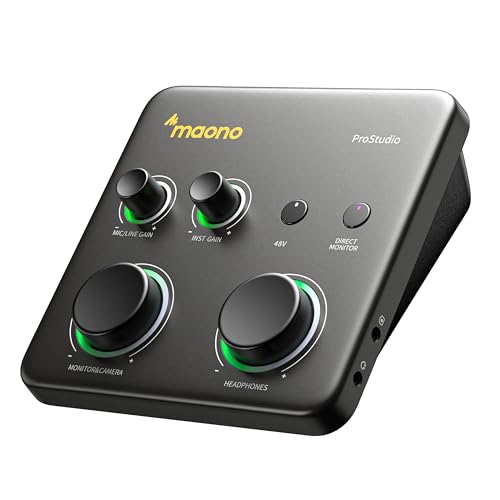
- Dual USB ports connect iPhone or iPad and computer together
- 70dB gain and 24-bit/192kHz recording support
- Loopback, auto-gain, and software routing aid streaming
Best For: Creators needing flexible mobile and desktop audio routing
Best for Guitarists
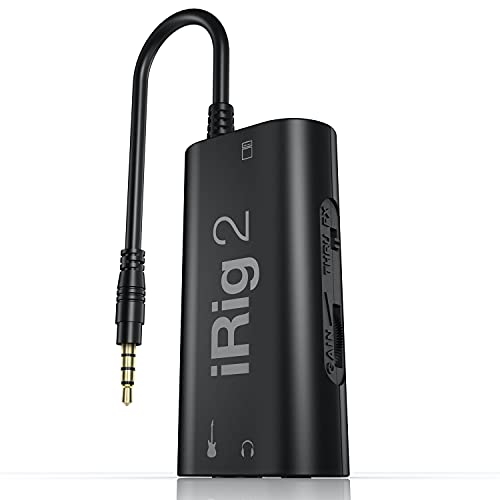
- Compact plug-and-play guitar and bass interface
- 1/4-inch amplifier output plus headphone monitoring
- AmpliTube CS adds iOS effects and amp models
Best For: Guitarists wanting simple iPhone practice and recording
Best Portable Live-Streaming Dock
Synido A20 USB-C Audio Interface

- Pocket-sized interface with USB-C phone and computer support
- 24-bit/96kHz recording and adaptive instrument gain
- Phone-charging dock supports longer mobile livestreams
Best For: Mobile musicians and streamers recording instruments on the go
Best Guitar Pick
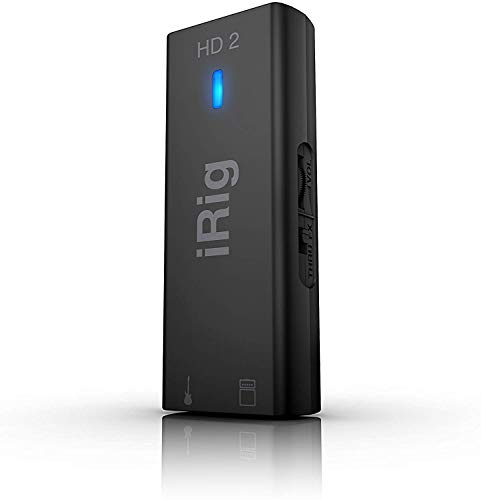
- 24-bit/96 kHz guitar recording
- Lightning, USB-C, and USB cables included
- Amp output and headphone monitoring
Best For: Guitarists needing a portable iPhone recording interface
Best Pocket Option

- Zero-latency direct guitar monitoring
- USB-C and Lightning plug-and-play support
- Tiny clip-on design needs no charging
Best For: Mobile guitar practice, recording, and livestreaming
Best All-Around Recording
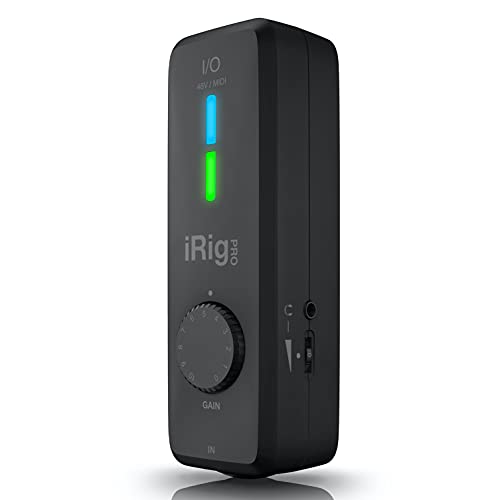
- 24-bit/96 kHz recording
- XLR/Hi-Z input with phantom power
- MIDI In/Out and multi-device cables
Best For: Creators recording instruments, microphones, and MIDI gear
Best Overall – Focusrite Scarlett Solo 3rd Gen
The Focusrite Scarlett Solo 3rd Gen is a strong audio interface for iPhone and iPad users who want studio-oriented recording quality in a compact two-channel setup. It provides an XLR mic input, a Hi-Z instrument input, Air mode, and recording up to 24-bit/192kHz. iOS compatibility is listed for iPadOS, so confirm your Apple device and cable requirements before buying.
Best For: Solo musicians, vocalists, podcasters, and home studios needing a trusted USB interface with a dedicated guitar input.
Pros:
- 24-bit/192kHz converters support detailed recordings.
- Air mode can add clarity to acoustic instruments and vocals.
- Dedicated XLR mic and high-headroom instrument inputs simplify guitar-and-vocal recording.
- Includes recording software and the Hitmaker Expansion bundle.
Cons:
- Only one XLR mic preamp is available.
- Its included cable is USB Type-C to USB-A, so an additional connection solution may be needed for some iPhone or iPad setups.
The Scarlett Solo is best suited to musicians who prioritize preamp performance, instrument compatibility, and bundled software over mobile-specific convenience. Its iOS support makes it a flexible choice, though mobile connectivity should be checked before purchase.
Best Budget 2-Input Option – PIYONE Q28 USB-C Interface
The PIYONE Q28 is a practical audio interface for iPhone and other mobile recording setups, with two combo inputs, USB-C connectivity, and 24-bit/192kHz support. Its class-compliant design is intended for plug-and-play use, while 48V phantom power accommodates condenser microphones. Check the product’s mobile compatibility and required cable setup for your specific iPhone.
Best For: Mobile creators and home recordists who need two inputs, USB-C connectivity, and straightforward monitoring controls.
Pros:
- Two combo inputs support microphones and Hi-Z instruments.
- 24-bit/192kHz converters target high-fidelity recording.
- Direct monitoring provides zero-latency tracking.
- Built-in 3.5mm headphone output works with standard headsets.
Cons:
- The supplied details list Windows as the operating system, so iPhone compatibility should be verified before purchase.
- Its 0.74 kg weight is less travel-friendly than ultra-compact mobile interfaces.
The Q28 offers useful two-channel flexibility and simple controls for a home or mobile workstation. It is worth considering for USB-C users, but the listed operating-system information makes device compatibility an important buying check.
Best for Mobile Creators – MAONO P2 Hybrid Interface
The MAONO P2 is a versatile audio interface for iPhone, Android, computers, and iPad users who record and stream across multiple devices. Its dual USB ports can connect a computer and phone or tablet simultaneously, while dual XLR inputs, loopback, direct monitoring, and independent mute controls support podcasts, live streams, and music creation.
Best For: Podcasters, streamers, and musicians who want to record, monitor, and route audio between a phone and computer.
Pros:
- MFi-certified connectivity supports iPhone and iPad workflows.
- Dual USB ports allow simultaneous computer and mobile connections.
- Dual XLR inputs, 24-bit/192kHz recording, and 56dB gain suit vocals and instruments.
- Loopback and ProStudio 2 software support desktop-audio routing and creator workflows.
Cons:
- Its broad feature set may be more than needed for simple one-microphone recording.
- Advanced routing and software features can require more setup than a basic interface.
The P2 stands out when mobile recording is part of a larger creator workflow. Its simultaneous computer-and-phone connectivity, loopback, and independent monitoring controls make it particularly useful for streaming and podcast production.
Best Lightning Adapter – Saramonic SR-EA2D Lightning Interface
The Saramonic SR-EA2D is a purpose-built audio interface for iPhone and iPad models with Lightning ports. It accepts 3.5mm TRS or TRRS microphones and provides a 3.5mm headphone output for real-time monitoring. Its plug-and-play design requires no drivers or additional software, making it a convenient option for mobile video, streaming, meetings, and simple audio capture.
Best For: Lightning-equipped iPhone and iPad users recording with lavalier, shotgun, wireless, or other 3.5mm microphones.
Pros:
- Direct Lightning connection is designed for compatible iPhones and iPads.
- Supports both TRS and TRRS microphone connections.
- Includes a 3.5mm headphone output for monitoring and playback.
- Compact, device-mountable design requires no drivers.
Cons:
- It is limited to Lightning iOS devices rather than USB-C phones and tablets.
- Its 48kHz maximum sample rate is lower than the 192kHz support offered by the larger interfaces in this roundup.
- It uses a 3.5mm auxiliary microphone input rather than an XLR input.
The SR-EA2D is the simplest choice for creators who already use a Lightning iPhone or iPad and a 3.5mm microphone. It is less suitable for XLR microphones or higher-resolution studio recording, but its small, driver-free design is highly convenient.
Best Mobile Studio Hub – MAONO P1 USB Audio Interface
If you need an audio interface for iPhone that can also support computer recording, the MAONO P1 offers unusually flexible connectivity. Its dual USB ports let you connect a phone or iPad and a computer at the same time, while up to 70dB of gain, 24-bit/192kHz recording, and loopback support suit vocals, guitars, podcasts, and streams.
Best For: Creators who record, stream, and route audio between an iPhone, computer, microphone, and instrument.
Pros:
- MFi-certified dual-USB connectivity supports simultaneous computer and iPhone or iPad use.
- Up to 70dB of gain can drive demanding dynamic microphones without an external booster.
- Auto-gain, loopback, mute controls, and software routing simplify streaming and recording.
- Compact metal housing, direct monitoring, and 24-bit/192kHz recording support mobile or desktop setups.
Cons:
- Its broad feature set and routing software may be more than casual users need.
- Best suited to users prepared to work with compatible recording or streaming software.
The P1 is the most versatile option here for a creator building a flexible mobile and desktop workflow. Choose it if you want more than basic instrument input, especially for podcasting, live streaming, or multitrack-style routing.
Best for Guitarists – IK Multimedia iRig 2
The IK Multimedia iRig 2 is a compact, straightforward audio interface for iPhone and iPad focused on guitar and bass. It provides an instrument input, adjustable gain, headphone monitoring, and a 1/4-inch amplifier output, making it practical for practice, recording, and live rigs.
Best For: Guitarists and bassists who want a simple mobile setup with effects-app support and amplifier connectivity.
Pros:
- Plug-and-play design with adjustable gain works with compatible iPhone and iPad connections.
- 1/4-inch amplifier output connects directly to an amp without an additional adapter.
- Headphone output supports private monitoring, while the thru switch preserves a clean analog signal.
- Works with the AmpliTube CS iOS app for modeled effects and amplifiers.
Cons:
- Newer iPhones may require an Apple Lightning-to-3.5mm or USB-C-to-3.5mm adapter.
- Its instrument-focused design is less suitable for microphones, podcasts, or multi-input recording.
For guitar-focused mobile recording, the iRig 2 keeps the setup small and understandable. It is a particularly sensible choice when you want to practice through iOS effects, monitor with headphones, or send your guitar to a physical amplifier.
Best Portable Live-Streaming Dock – Synido A20 USB-C Audio Interface
The Synido A20 is a pocket-sized audio interface for iPhone designed around instrument recording and mobile content creation. Its USB-C connection, adaptive instrument gain, loopback and monitor functions, and phone-charging dock make it useful for musicians who record or livestream away from a traditional studio.
Best For: Mobile musicians and streamers who need instrument input, wireless backing tracks, and phone charging in one compact device.
Pros:
- 24-bit/96kHz recording captures guitar and other instruments with detailed audio.
- Adaptive gain helps accommodate guitars, basses, keyboards, digital pianos, and electronic drums.
- USB-C connectivity supports iPhone, Android, Mac, and PC setups, subject to device compatibility.
- Dock design can charge the phone during mobile livestreams, while loopback and monitoring support live production.
Cons:
- USB-C audio input compatibility should be confirmed for the specific phone or camera.
- The compact two-channel design is aimed at portable use rather than larger studio setups.
- Wireless accompaniment adds convenience but may not replace a full computer-based routing setup.
The A20 stands out when portability and livestream practicality matter most. Its charging-dock design and adaptive gain make it a strong fit for musicians recording directly to a phone, while the USB-C requirement deserves attention before purchase.
Best Guitar Pick – iRig HD 2
If you need an audio interface for iPhone focused on guitar recording and practice, the IK Multimedia iRig HD 2 combines plug-and-play connectivity with 24-bit/96 kHz recording. Its instrument input, amp output, and headphone control make it suitable for both silent practice and connecting to an amplifier.
Best For: Guitarists who want a compact, high-resolution interface for iPhone, iPad, Mac, or PC.
Pros:
- Supports 24-bit/96 kHz recording.
- Includes Lightning, USB-C, and USB cables for broad device compatibility.
- Provides an instrument input, switchable amp output, headphone output, and input-gain control.
- Lightweight design includes mounting clips and fits easily in a gig bag.
Cons:
- Has one channel and is primarily designed around guitar or other line-level instruments.
- Its included software support centers on AmpliTube and TONEX offerings.
The iRig HD 2 is a strong choice when guitar is the priority and you want high-resolution recording plus flexible monitoring and amplifier connectivity in a portable package.
Best Pocket Option – JOYO MOMIX CAB
The JOYO MOMIX CAB is a simple audio interface for iPhone built for mobile guitar recording, practice, and streaming. It requires no charging, drivers, or software installation, and its direct-monitoring design lets you hear the guitar signal without latency while phone audio plays through the headphones.
Best For: Guitarists who want an extremely small, plug-and-play interface for recording ideas, practicing, or livestreaming.
Pros:
- Offers direct, zero-latency monitoring of the guitar signal.
- Includes USB-C and Lightning connectivity for compatible phones.
- Runs without batteries, charging, drivers, or software setup.
- Pocket-sized body includes a clip for a pocket, belt, or guitar strap.
Cons:
- The dry guitar signal cannot be muted, so it is not designed for real-time software amp simulations or effects processing.
- Third-party cables may not work; the included USB-C cable should be used.
- Maximum sample rate is 48 kHz.
The MOMIX CAB favors convenience over extensive controls. It is a practical pick for quick guitar capture and low-latency monitoring, provided its always-on direct signal suits your workflow.
Best All-Around Recording – iRig Pro I/O
For a more versatile audio interface for iPhone, the IK Multimedia iRig Pro I/O supports guitar, bass, microphones, and MIDI equipment. It combines 24-bit/96 kHz recording with a combo XLR/Hi-Z input, phantom power, MIDI connectivity, and direct headphone monitoring.
Best For: Musicians and creators who need one compact interface for instruments, microphones, MIDI controllers, and multiple operating systems.
Pros:
- Records at up to 24-bit/96 kHz.
- Combo XLR/Hi-Z input accommodates microphones and instruments.
- Provides +48V phantom power for condenser microphones.
- Includes MIDI In/Out and Lightning, USB-C, and USB-A cables.
Cons:
- Its 2-channel configuration may be limiting for larger recording setups.
- The compact design has only one combo audio input.
- Its feature set may be more than needed for simple guitar-only recording.
The iRig Pro I/O is the most adaptable option in this group. Choose it when you want to move beyond guitar-only recording and connect microphones, instruments, or MIDI gear across iOS, macOS, Windows, and Android devices.
How We Picked the Best Audio Interface for Iphone
We selected interfaces based on iPhone compatibility, connection type, input flexibility, recording quality, portability, monitoring options, and overall usefulness for common mobile workflows. The lineup includes models designed for microphones, guitars, podcasts, livestreaming, and simple stereo recording.
Compatibility matters as much as specifications. Some interfaces connect through Lightning, while newer models use USB-C; others may require an adapter depending on your iPhone. We also considered whether each model offers direct headphone monitoring, useful gain control, phantom power, or instrument-specific inputs.
Quick Comparison
| Best For | Look For | Typical Connection |
|---|---|---|
| Vocals and microphones | XLR input, gain control, phantom power | USB-C or Lightning |
| Guitar recording | Instrument input, low latency, direct monitoring | USB-C, Lightning, or dedicated guitar cable |
| Podcasting and streaming | Two inputs, headphone output, easy monitoring | USB-C or Lightning |
| Travel recording | Compact design and simple plug-and-play setup | Lightning or USB-C |
Key Buying Factors for an Audio Interface for Iphone
Connector and IPhone Compatibility
First, check whether your iPhone uses Lightning or USB-C. A USB-C interface may be the most flexible choice for newer iPhones, iPads, Macs, and PCs, while Lightning models can provide a straightforward connection for older Apple devices. Confirm whether the required cable is included and whether your phone can power the interface.
Inputs and Recording Needs
Choose a single instrument input for basic guitar practice or songwriting. For vocals, microphones, or interviews, look for an XLR input. Dual-input interfaces are better for recording two microphones, a microphone and guitar, or stereo sources.
Monitoring and Power
A headphone output with direct monitoring helps you hear yourself without distracting latency. If you use a condenser microphone, verify that the interface supplies 48V phantom power. Battery operation or a powered hub may be necessary when the iPhone cannot provide enough power.
Audio Quality and Controls
Higher sample-rate and bit-depth specifications can support detailed recording, but practical usability matters more for many mobile projects. Prioritize clean preamps, an accessible gain knob, reliable controls, and stable compatibility with your recording app.
Who Should Buy Which Audio Interface for Iphone?
Choose a compact guitar interface if you mainly practice, create demos, or record direct instrument tracks. Singer-songwriters and vocalists should favor an XLR-equipped model with gain control, monitoring, and phantom power when needed. Podcasters and livestreamers will benefit from two inputs and a dedicated headphone output.
For frequent travel, select the smallest plug-and-play interface that supports your microphone or instrument. If you record across an iPhone, iPad, and computer, a USB-C model with multiple cable options offers the best long-term flexibility. Before buying, confirm your phone’s port, required adapters, app compatibility, and power requirements.