
The right audio interface can turn an iPad Pro into a capable mobile recording, streaming, or music-production setup. The best choice depends on your inputs, connection type, power needs, and whether you record guitar, vocals, instruments, or multiple sources.
We compare 10 options ranging from pocket-sized mobile interfaces to dual-input models with studio-focused controls, helping you match features to your workflow without paying for hardware you will not use.
Best 10 Audio Interface for Ipad Pro Picks for 2026
Best All-Around Pick
Focusrite Scarlett Solo 3rd Gen

- Air mode for added vocal and instrument clarity
- One mic input plus a Hi-Z guitar/bass input
- 24-bit/192kHz recording with included software
Best For: Songwriters and podcasters using one mic and one instrument
Best Budget 2-Input Option
PIYONE Q28 USB-C Audio Interface

- Two combo inputs for microphones and instruments
- 24-bit/192kHz recording with 48V phantom power
- Direct monitoring and USB-C bus power
Best For: Mobile creators needing two recording inputs
Best Premium Solo Pick
Focusrite Scarlett Solo 4th Gen

- 120dB dynamic range for detailed recordings
- Air modes add presence and harmonic drive
- One mic input and one Hi-Z instrument input
Best For: Solo artists recording vocals and guitar
Best Ultra-Portable Pick

- 20.5 g pocket-style design for mobile use
- Type-C and Lightning connectivity options
- Low-latency guitar recording and headphone monitoring
Best For: Beginners and guitarists recording or livestreaming on the go
Versatile Recording Pick
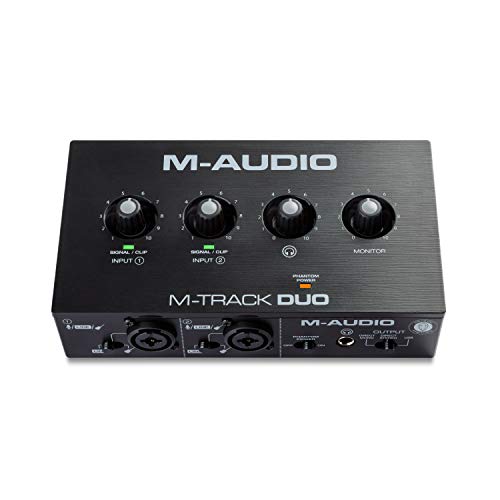
- Two combo inputs for mic, line, and instrument sources
- 48 kHz recording with phantom power
- Direct monitoring for podcasting and streaming
Best For: Two-channel mobile recording and livestreaming
High-Resolution Mobile Pick
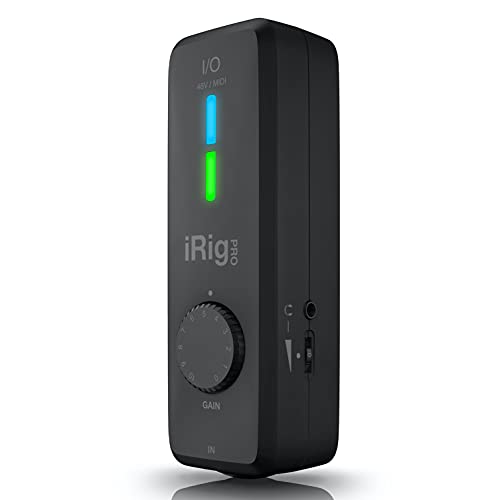
- 24-bit/96 kHz recording capability
- XLR/Hi-Z input with phantom power
- Includes USB-C, Lightning, and USB-A cables
Best For: Mobile music production and MIDI-equipped setups
Ultra-Compact Mic Pick

- Dual 3.5mm microphone inputs
- Auto-sensing TRS/TRRS compatibility
- Includes USB-C and Lightning cables
Best For: Portable recording with lavaliers and 3.5mm microphones
Best High-Fidelity Option

- MFi-certified USB-C connections for iPad and iPhone
- Dual combo inputs with 48V phantom power
- Automatic gain control and high-resolution recording
Best For: Beginners and musicians wanting a detailed, portable setup
Best Gain for Dynamic Mics
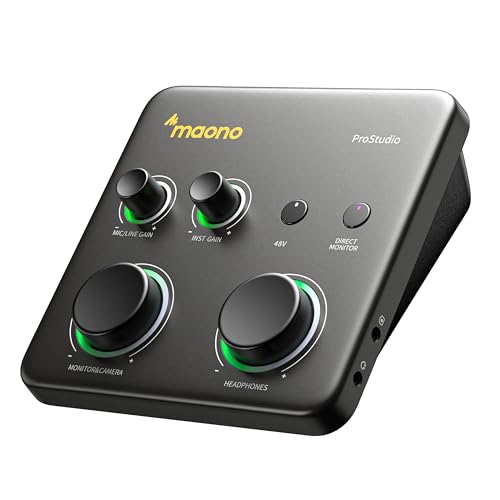
- Up to 70dB gain for demanding dynamic microphones
- Dual USB and MFi-certified iPad connectivity
- Auto-Gain, loopback, and direct monitoring
Best For: Podcasters and streamers using gain-hungry dynamic microphones
Best All-Around Pick – Focusrite Scarlett Solo 3rd Gen
The Focusrite Scarlett Solo 3rd Gen is a practical audio interface for iPad Pro users who want dependable vocal and guitar recording in a compact setup. It combines a mic preamp, Hi-Z instrument input, Air mode, and recording resolution up to 24-bit/192kHz.
Best For: Songwriters and podcasters recording one microphone and one guitar or bass.
Pros:
- Air mode adds clarity to acoustic instruments and vocals.
- Separate XLR mic and high-headroom instrument inputs suit common home-recording setups.
- Supports up to 24-bit/192kHz recording and includes useful music software.
Cons:
- Includes only one mic preamp.
- The listed package uses a USB Type-C-to-A cable, so an iPad Pro connection may require the appropriate adapter or hub.
This is a strong general-purpose choice when clean recording quality and straightforward controls matter more than multiple inputs. Confirm your iPad Pro’s connection requirements before buying.
Best Budget 2-Input Option – PIYONE Q28 USB-C Audio Interface
The PIYONE Q28 is a compact audio interface for iPad Pro setups that need two combo inputs, USB-C connectivity, and high-resolution recording. Its class-compliant design is intended for plug-and-play use, while direct monitoring helps reduce tracking latency.
Best For: Mobile creators who need two inputs for microphones, instruments, or a small recording setup.
Pros:
- Two XLR/TRS combo inputs support microphones and instruments.
- Offers 24-bit/192kHz recording and 48V phantom power.
- USB-C bus power, direct monitoring, loopback, and a 3.5mm headphone output support flexible workflows.
Cons:
- Supplied details list Windows compatibility, so iPad Pro support should be verified before purchase.
- It is heavier than the pocket-style mobile interface in this roundup.
The Q28 stands out for input flexibility and monitoring features at a potentially accessible price. Because the listed operating-system details emphasize Windows, confirm class-compliant iPad Pro operation and any required adapter before ordering.
Best Premium Solo Pick – Focusrite Scarlett Solo 4th Gen
The Focusrite Scarlett Solo 4th Gen is a refined audio interface for iPad Pro musicians who want a simple one-mic, one-instrument recording rig. Its 120dB dynamic range, updated Air modes, and 24-bit/192kHz support target polished home and mobile recordings.
Best For: Solo artists who want improved conversion performance and an easy vocal-and-guitar setup.
Pros:
- 120dB dynamic range uses converters from Focusrite’s higher-end interface range.
- Air modes add presence and harmonic drive to vocals and guitars.
- Includes Pro Tools Intro+, Ableton Live Lite, Cubase LE, and Hitmaker Expansion.
Cons:
- Its single mic preamp limits multi-microphone recording.
- The package includes a USB A-to-C cable, so iPad Pro users may need a compatible adapter or hub.
Choose the 4th Gen when recording quality refinements and current-generation features justify stepping up from a basic interface. It remains intentionally focused on solo recording rather than larger sessions.
Best Ultra-Portable Pick – Pocket Guitar Audio Interface
This pocket guitar audio interface is a simple audio interface for iPad Pro users who prioritize portability and live streaming. It connects an electric guitar or bass through a 1/4-inch input, provides headphone monitoring, and includes Type-C and Lightning connectivity options.
Best For: Beginners and mobile guitarists recording or livestreaming on an iPad, iPhone, Android device, or laptop.
Pros:
- Weighs just 20.5 g and uses a pocket-friendly back-clip design.
- Includes Type-C connectivity and a Lightning-to-Type-C adapter for iPad and iPhone use.
- Plug-and-play operation, low-latency monitoring, and 24-bit/48kHz audio suit simple mobile recording.
Cons:
- Designed for recording only, without editing or mixing functions.
- Its 48kHz maximum sample rate is lower than the other interfaces here.
- It provides a guitar input rather than a dedicated XLR microphone preamp.
This is the most convenient choice for quick guitar capture and mobile streaming, especially when size and broad device compatibility matter. Pick a fuller interface instead if you need XLR microphones, higher sample rates, or in-app mixing flexibility.
Versatile Recording Pick – M-Audio M-Track Duo
The M-Audio M-Track Duo is a practical audio interface for iPad Pro users who need two inputs for recording vocals, guitar, or line-level sources. It supports iOS and offers combo XLR, line, and instrument inputs, though an appropriate iPad connection setup may be needed.
Best For: Podcasters, musicians, and livestreamers who want two-channel recording with flexible input options.
Pros:
- Two combo XLR/line/instrument inputs with phantom power
- 48 kHz recording and transparent Crystal Preamps
- Zero-latency monitoring via the USB/Direct switch
- Includes MPC Beats and other production software
Cons:
- Uses USB Type-B connectivity rather than a direct USB-C iPad connection
- Less compact than the smallest mobile-focused interfaces
Choose this model if input flexibility matters more than pocket-sized portability. Its two-channel design and direct monitoring make it well suited to simple mobile recording, podcasting, and streaming setups.
High-Resolution Mobile Pick – IK Multimedia iRig Pro I/O
The IK Multimedia iRig Pro I/O is a strong audio interface for iPad Pro users who want high-resolution recording in a compact format. It includes Lightning, USB-C, and USB-A cables, plus an XLR/Hi-Z combo input for microphones and instruments.
Best For: Mobile musicians and creators who need 24-bit/96 kHz recording, MIDI connectivity, and broad device compatibility.
Pros:
- Supports 24-bit/96 kHz recording
- XLR and Hi-Z combo input with +48V phantom power
- Includes Lightning, USB-C, and USB-A cables
- MIDI In/Out supports controllers and keyboards
Cons:
- Only one combo audio input is listed
- Its compact design may offer fewer hands-on controls than larger interfaces
The iRig Pro I/O stands out for flexible connectivity and higher maximum resolution. It is especially useful when an iPad Pro setup also needs to work with Macs, PCs, Android devices, or MIDI equipment.
Ultra-Compact Mic Pick – RØDE AI-Micro
The RØDE AI-Micro is an ultra-compact audio interface for iPad Pro users recording with microphones that have 3.5mm outputs. Its dual auto-sensing inputs, included connection cables, and high-power headphone output make it convenient for mobile recording, calls, and streaming.
Best For: Creators using lavaliers, RØDE VideoMics, wireless systems, or other 3.5mm microphones.
Pros:
- Dual-channel design in a 13 g body
- Accepts TRS or TRRS microphones automatically
- Includes USB-A, USB-C, and Lightning cables
- Provides zero-latency headphone monitoring
Cons:
- Designed for 3.5mm microphones rather than XLR microphones
- Listed maximum sample rate is 20 kHz
The AI-Micro is a convenient choice when portability and simple microphone connection are the priorities. Its two inputs are well suited to interviews, mobile filmmaking, podcasting, and video calls, but XLR users will need a different interface.
Best Hybrid Pick – MAONO P2 Dual-USB Interface
The MAONO P2 is a flexible audio interface for iPad Pro users who want to record in GarageBand or Logic Pro while also connecting another device for streaming or uploading. Its dual USB ports, two XLR inputs, and loopback features suit mobile creators who move between recording and live content.
Best For: Musicians, podcasters, and streamers who need simultaneous computer-and-iPad connectivity.
Pros:
- Dual USB ports with MFi-certified connectivity support simultaneous computer and iPad connections.
- Two XLR inputs, 48V-compatible microphone support, and 24-bit/192kHz recording suit vocals, guitars, and podcasts.
- Loopback, Stream Mode, independent mute controls, and direct monitoring simplify content creation.
- Compact aluminum-alloy housing and a tilted control layout work well on a desk or mobile setup.
Cons:
- Its broad routing and software features may be more than needed for simple one-microphone recording.
- The supplied notes do not specify iPad power requirements or whether every setup works without an external power source.
The P2 stands out when workflow flexibility matters. It combines practical mobile connectivity with creator-focused routing and monitoring, making it a strong choice for an iPad-based recording and streaming setup.
Best High-Fidelity Option – MAONO P2 Studio Interface
For shoppers seeking an audio interface for iPad Pro with straightforward controls and studio-oriented specifications, the MAONO P2 offers MFi-certified USB-C connectivity, dual combo inputs, and automatic gain control. It is designed for mobile recording, musicians, and podcast workflows.
Best For: Users who prioritize high-resolution recording, simple level management, and portable construction.
Pros:
- MFi certification supports direct USB-C connections with iPad, iPhone, and PC systems.
- Dual XLR-TRS combo inputs and 48V phantom power accommodate condenser microphones and instruments.
- Automatic gain control, gain indicators, and one-button mute make operation approachable for beginners.
- Its stated 192kHz/48-bit resolution and 120dB dynamic range target detailed recordings.
Cons:
- The supplied specifications use both 192kHz and 48-bit terminology, so buyers should confirm the exact supported recording modes.
- At two channels, it is aimed at compact setups rather than larger multi-microphone productions.
This P2 model balances mobile compatibility with an accessible control scheme. It makes sense for iPad users who want dual inputs and high-resolution recording without a complicated front panel.
Best Gain for Dynamic Mics – MAONO P1 USB Interface
The MAONO P1 is an audio interface for iPad Pro aimed at creators using demanding dynamic microphones. Its up-to-70dB gain, dual USB connectivity, and automatic gain control help streamline recording, streaming, and guitar or vocal sessions from an iPad or computer.
Best For: Podcasters, vocalists, and streamers using gain-hungry dynamic microphones.
Pros:
- Up to 70dB of gain is designed to drive demanding dynamic microphones without an external booster.
- Dual USB ports and MFi-certified connectivity allow simultaneous computer-and-iPad workflows.
- Auto-Gain, loopback, Stream Mode, and direct monitoring support efficient streaming and recording.
- 24-bit/192kHz capture, -130dB EIN, and ASIO support target clean, low-latency audio.
Cons:
- The feature-rich routing and software options may take time to learn.
- The supplied notes do not list the complete input/output layout or confirm every iPad power configuration.
The P1 is the most targeted choice here for users whose microphones need substantial preamp gain. Its automatic level control and creator-focused routing also make it practical for live content and podcast production.
How We Picked the Best Audio Interface for Ipad Pro
We focused on interfaces that are marketed for iPad, iPhone, or other USB-C and Lightning devices, while considering practical compatibility for modern iPad Pro models. Selection criteria included input and output configuration, connector flexibility, recording resolution, gain control, monitoring features, portability, and suitability for music production, podcasting, live streaming, and guitar recording.
Compatibility is not determined by sample rate alone. An interface may still require a USB-C hub, camera adapter, powered connection, or separate cables. We also considered whether each model is best suited to a simple one-person setup or a more demanding two-source workflow.
Quick Comparison
| Best For | What to Look For |
|---|---|
| Solo vocals or guitar | One versatile input, direct monitoring, and compact size |
| Two-person recording | Two independent inputs with separate gain controls |
| Mobile streaming | Small footprint, device compatibility, and easy monitoring |
| Studio-style recording | Higher-resolution conversion, stable drivers, and reliable controls |
| Guitar and instrument practice | High-impedance input, low latency, and headphone monitoring |
Key Buying Factors for an Audio Interface for Ipad Pro
Connection and IPad Compatibility
Check whether the interface includes USB-C, Lightning, or both. Current iPad Pro models generally use USB-C, but cable requirements vary. Some interfaces draw power from the tablet, while others work more reliably with external power or a powered hub.
Inputs and Preamps
A single combo input is enough for one microphone or instrument at a time. Choose two inputs if you record vocals and guitar together, interview another person, or want a stereo source. Look for phantom power when using condenser microphones and an instrument input for passive guitar or bass pickups.
Monitoring and Recording Quality
Direct monitoring helps you hear yourself without distracting latency. Headphone volume control, monitor outputs, and a clear input meter are also valuable for mobile setups. Resolutions such as 24-bit/96kHz or 24-bit/192kHz can be useful, but clean preamps and practical controls matter more for most iPad recordings.
Portability and Power
Compact interfaces are easier to carry but may offer fewer controls or connections. If you plan to record away from a desk, confirm cable length, power draw, and whether the interface can operate from the iPad without draining its battery too quickly.
Who Should Buy Which Audio Interface for Ipad Pro?
Choose a compact mobile interface if you mainly stream, practice, or record one source while traveling. A dual-input USB model is better for singer-songwriters, podcasts, lessons, and simultaneous microphone-and-instrument recording. Buyers building a more permanent setup should prioritize dependable gain controls, phantom power, balanced outputs, and straightforward monitoring over headline specifications.
For an Audio Interface for Ipad Pro, the best match is the one that fits your exact signal chain. Before buying, list the microphones and instruments you will connect, confirm the required adapter or cable, and decide whether you need battery-friendly portability or desktop-style expansion.