
The best audio interface for guitar makes it easier to record clean instrument tracks, practice with amp-simulation software, and stream without relying on a built-in computer sound card.
This roundup compares 10 options across portable guitar adapters, affordable single-input models, and multi-input interfaces for guitarists who also record vocals or other instruments.
Best 10 Audio Interface for Guitar Picks for 2026
Best Overall
Focusrite Scarlett Solo 3rd Gen

- Hi-Z input for guitar and bass
- Air mode adds clarity
- 24-bit/192kHz recording support
Best For: Home recording and solo guitar-and-vocal sessions
Best Portable Pick
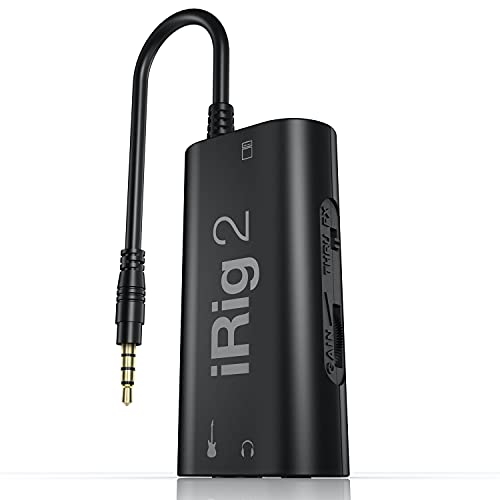
- Compact mobile guitar interface
- Headphone and amp outputs
- Works with AmpliTube CS
Best For: Mobile recording, practice, and lightweight live rigs
Best Updated Model
Focusrite Scarlett Solo 4th Gen

- 120dB dynamic range
- Hi-Z guitar input
- Updated Air modes and software bundle
Best For: Current-generation guitar and vocal recording
Best Overall Features
Focusrite Scarlett 2i2 4th Gen

- Two Hi-Z instrument inputs
- 120 dB dynamic range and 192 kHz support
- Auto Gain, Clip Safe, and Air modes
Best For: Home producers wanting advanced recording assistance
Best Pocket Pick

- Zero-latency direct guitar monitoring
- USB-C and Lightning phone connectivity
- Pocket-sized clip-on design
Best For: Mobile guitar recording, practice, and livestreaming
Best Versatile Value
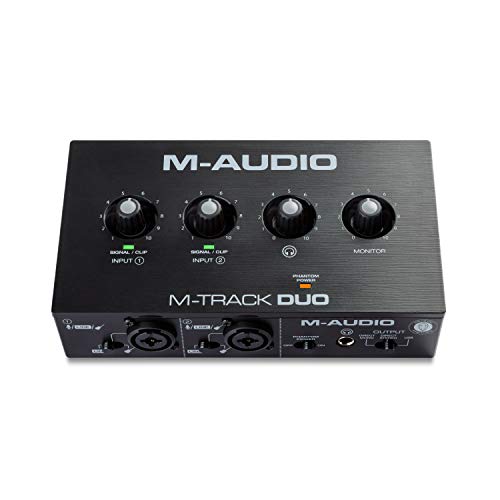
- Two combo XLR, line, and instrument inputs
- USB/direct zero-latency monitoring
- Includes MPC Beats software
Best For: Home recording, guitar, vocals, podcasting, and streaming
Best High-Resolution Option

- 24-bit/192kHz recording capability
- Dedicated guitar input and direct monitoring
- Routing software with virtual channels and loopbacks
Best For: Detailed guitar recording, vocals, and livestreaming
Best Overall – Focusrite Scarlett Solo 3rd Gen
The Focusrite Scarlett Solo 3rd Gen is a versatile audio interface for guitar players who want polished recordings at home. Its Hi-Z instrument input, Air mode, 24-bit/192kHz support, and bundled recording software make it suitable for guitar, vocals, and basic production.
Best For: Guitarists who want a capable home-recording interface with strong sound quality and useful software included.
Pros:
- Hi-Z instrument input is designed for guitar and bass.
- Air mode can add clarity to acoustic instruments.
- Supports recording and mixing up to 24-bit/192kHz.
- Includes several DAWs, effects, instruments, and mastering tools.
Cons:
- Provides only one XLR microphone preamp.
- It is an older generation than the Scarlett Solo 4th Gen.
Choose this model if you want dependable studio-style recording and a generous software bundle without needing multiple microphone inputs. It is especially practical for solo guitar-and-vocal sessions.
Best Portable Pick – IK Multimedia iRig 2
The IK Multimedia iRig 2 is a compact audio interface for guitar designed around mobile recording and practice. It connects to compatible iPhone, iPad, iPod touch, or Mac setups, while its amplifier output makes it useful in a live or rehearsal rig.
Best For: Guitarists who want a lightweight way to connect an instrument to a mobile device, headphones, or an amplifier.
Pros:
- Portable plug-and-play design with an adjustable gain dial.
- Includes both headphone and 1/4-inch amplifier outputs.
- Works with AmpliTube CS for mobile amp and effects processing.
- Thru mode preserves a clean analog signal for uses such as tuning.
Cons:
- Compatibility with newer devices may require an adapter.
- It is intended for compatible mobile and Mac devices rather than a broad computer setup.
This is the most convenient choice for mobile guitarists who prioritize portability over studio-style expansion. The amplifier output and clean-thru option also give it flexibility beyond simple recording.
Best Updated Model – Focusrite Scarlett Solo 4th Gen
The Focusrite Scarlett Solo 4th Gen is a modern audio interface for guitar that combines a dedicated Hi-Z input with improved conversion performance. Its 120dB dynamic range, enhanced Air modes, and included production software make it a strong fit for recording guitar and vocals.
Best For: Songwriters and guitarists who want the latest Scarlett Solo generation and a more refined recording feature set.
Pros:
- Dedicated Hi-Z instrument input for guitar.
- 120dB dynamic range supports detailed recordings.
- Air modes add presence and harmonic character to guitars and vocals.
- Includes Pro Tools Intro+, Ableton Live Lite, Cubase LE, and Hitmaker Expansion.
Cons:
- Still has one XLR microphone preamp.
- Its two-channel layout may be limiting for larger recording setups.
The 4th Gen Solo is the logical pick when you want a current, straightforward interface for guitar and vocals. It preserves the simple two-input workflow while adding updated conversion and Air-mode features.
Best Budget Interface – Behringer UMC22
The Behringer UMC22 is a budget-friendly audio interface for guitar with a simple 2×2 layout. It offers an instrument input, a Midas-designed mic preamp, direct monitoring, and compatibility with popular recording software for basic computer-based recording.
Best For: Beginners and solo musicians seeking an affordable interface for guitar, instruments, and occasional microphone recording.
Pros:
- Dedicated 1/4-inch instrument input for guitar.
- Midas-designed mic preamp supports microphone recording.
- Direct monitoring helps musicians hear performances clearly.
- Compatible with popular DAWs such as Pro Tools, Ableton Live, and Cubase.
Cons:
- Maximum sample rate is limited to 48 kHz in the supplied product description.
- Computer compatibility is listed for Windows rather than Mac or mobile devices.
- The compact 2×2 design may not suit larger recording setups.
The UMC22 makes sense when keeping costs low is the priority. Its direct monitoring and straightforward connections cover the essentials for guitar practice recordings, demos, and simple home projects.
Best Budget Pick – M-Audio M-Track Solo
The M-Audio M-Track Solo is a compact, affordable audio interface for guitar players who want to record, stream, podcast, or monitor with minimal setup. Its dedicated instrument input, phantom-powered mic input, and USB connectivity make it a flexible choice for a simple home recording rig.
Best For: Beginners, guitarists building a portable home studio, and creators who need recording and streaming flexibility.
Pros:
- Dedicated 1/4-inch instrument input for guitar and other line-level sources
- Phantom power supports condenser microphones through the combo input
- USB/direct monitoring switch helps provide zero-latency monitoring
- Includes MPC Beats and supports Ableton Live Lite
Cons:
- Maximum sample rate is 48 kHz
- Offers one combo input and one line/instrument input rather than a larger input set
Choose the M-Track Solo if you value portability and straightforward controls over advanced recording specifications. It is a practical entry-level option for guitar recording, basic vocal work, and live streaming.
Best for Durable Mobile Recording – Mackie Onyx Artist 1-2
The Mackie Onyx Artist 1-2 is a sturdy audio interface for guitarists who want higher-resolution recording and a dedicated Hi-Z connection. Its bus-powered USB design, direct monitoring, and rugged construction suit mobile recording as well as everyday home use.
Best For: Guitar and bass players who prioritize a durable build, 24-bit/192 kHz recording, and portable USB operation.
Pros:
- Dedicated 1/4-inch TRS input with Hi-Z switching for guitar and bass
- Supports 24-bit/192 kHz recording
- Onyx mic preamp includes 48V phantom power for condenser microphones
- Bus-powered USB connection requires no separate power adapter
Cons:
- Supplied operating-system details list Windows 10 compatibility
- Includes two inputs and two outputs, which may limit larger sessions
The Onyx Artist 1-2 is a strong fit when construction and mobile convenience matter as much as recording quality. Its Hi-Z input keeps guitar connection simple, while direct monitoring supports low-latency tracking.
Best Overall Features – Focusrite Scarlett 2i2 4th Gen
The Focusrite Scarlett 2i2 4th Gen is a feature-rich audio interface for guitarists who want detailed recording, easy level setup, and room to expand into vocal production. It combines two Hi-Z instrument inputs with 192 kHz conversion, Auto Gain, Clip Safe, and Air modes.
Best For: Guitarists and home producers seeking a polished two-input interface with modern recording assistance and extensive included software.
Pros:
- Two Hi-Z instrument inputs accommodate guitar and other instruments
- 120 dB dynamic range and 24-bit/192 kHz recording support
- Auto Gain and Clip Safe help manage recording levels
- Includes Pro Tools Intro+, Ableton Live Lite, Cubase LE, and Hitmaker Expansion
Cons:
- At 1.7 pounds, it is heavier than the M-Track Solo
- Its two-input design is intended for smaller recording sessions
The Scarlett 2i2 4th Gen is the most capable choice here for players who want strong specifications and helpful recording features in one compact unit. Air mode and the included software also make it useful beyond basic guitar tracking.
Best Pocket Pick – JOYO MOMIX CAB
The JOYO MOMIX CAB is a compact audio interface for guitar designed for phone recording, practice, and mobile livestreaming. Its direct monitoring sends your clean guitar signal straight to headphones with zero latency while also feeding audio to a connected phone.
Best For: Guitarists who want an inexpensive, highly portable interface for recording ideas or practicing with phone audio.
Pros:
- Direct, zero-latency monitoring through the headphone output.
- Plug-and-play operation with USB-C and Lightning connectivity.
- Pocket-sized design with a clip for a pocket, belt, or guitar strap.
- Requires no battery, charging, drivers, or software installation.
Cons:
- The dry guitar signal cannot be muted, so it is not intended for real-time software amp simulations or effects.
- Android users may need to enable OTG, and compatibility varies by phone.
- Third-party USB cables may not work reliably.
Choose the MOMIX CAB when portability and simple phone recording matter most. Its direct-monitoring design is useful for latency-free practice, but players seeking software-processed monitoring should consider a more conventional interface.
Best Versatile Value – M-AUDIO M-Track Duo
The M-AUDIO M-Track Duo is a flexible audio interface for guitar that also handles microphones, keyboards, podcasts, and livestreams. Its two combo inputs accept XLR, line, or instrument sources, while USB/direct monitoring supports low-latency listening.
Best For: Home musicians and creators who need two inputs for guitar, vocals, or other recording and streaming sources.
Pros:
- Two combo XLR/line/instrument inputs for versatile setups.
- 48V phantom power supports condenser microphones.
- USB/direct monitoring switch enables zero-latency monitoring.
- Includes MPC Beats and additional production software.
Cons:
- Maximum sample rate is 48 kHz.
- Uses USB Type-B connectivity rather than USB-C.
- The interface is less pocketable than compact phone-focused options.
The M-Track Duo is a sensible all-purpose choice for guitarists building a basic desktop recording setup. It offers useful input flexibility and monitoring controls without limiting the interface to guitar alone.
Best High-Resolution Option – MAONO PS22 Lite
The MAONO PS22 Lite is a high-resolution audio interface for guitar and vocals with 24-bit/192kHz recording and a 106dB dynamic range. It combines a dedicated instrument input with direct monitoring, 48V phantom power, and routing software for recording or livestreaming.
Best For: Guitarists, vocalists, and beginner content creators who want detailed recording and flexible streaming features.
Pros:
- Supports 24-bit/192kHz recording with a stated 106dB dynamic range.
- Dedicated instrument input for guitar and other sources.
- 48V phantom power and up to 56dB of microphone preamp gain.
- ProStudio Routing Software provides virtual channels and loopbacks.
Cons:
- Its advanced routing features may be more than a simple guitar-only setup needs.
- Software may require selecting the MAONO ASIO driver in compatible recording programs.
- The supplied notes emphasize PC, Mac, and iPad use rather than broad phone compatibility.
The PS22 Lite is a strong fit if recording detail and streaming flexibility are priorities. Its compact design and beginner-friendly modes keep setup approachable while leaving room for more involved routing workflows.
How We Picked the Best Audio Interface for Guitar
We focused on the features that matter most to guitarists: instrument-input compatibility, connection type, monitoring, portability, recording flexibility, and overall value. The list includes interfaces for electric guitar, bass, microphones, mobile practice, streaming, and basic home production.
We also considered whether each model suits a beginner setup or offers room to grow. A simple phone adapter may be ideal for practice, while a two-input USB interface is generally more useful for recording guitar and vocals together.
Quick Comparison
| Best For | Recommended Type | Why It Matters |
|---|---|---|
| Mobile practice | Phone guitar adapter | Compact, simple, and easy to use with compatible apps |
| Solo recording | Single-input USB interface | Provides a dedicated instrument connection without unnecessary complexity |
| Guitar and vocals | Two-input interface | Allows simultaneous recording of an instrument and microphone |
| Streaming | Interface with direct monitoring | Helps reduce distracting latency while playing live |
Key Buying Factors for an Audio Interface for Guitar
Instrument Input and Impedance
Look for a dedicated Hi-Z or instrument input when connecting passive electric guitars or basses directly. This input is designed to preserve the instrument’s tone more effectively than a standard line input.
Inputs and Recording Plans
A one-input interface is enough for guitar practice, overdubs, and solo recording. Choose two inputs if you want to record guitar and vocals at the same time, use stereo sources, or leave room for another musician.
Monitoring and Latency
Direct monitoring sends the input signal straight to your headphones, helping you hear your playing with minimal delay. This is especially useful when recording through a computer or streaming setup.
Device Compatibility
Check whether the interface uses USB-C, USB-A, Lightning, or a phone-specific connection. Mobile adapters are convenient, but traditional USB interfaces usually offer broader software support and more connectivity options.
Software and Power
Confirm that the interface works with your operating system, recording software, and preferred amp-simulation apps. Some larger interfaces draw power from USB, while portable phone models may require device-specific power or adapters.
Who Should Buy Which Audio Interface for Guitar?
- Choose a compact phone adapter if your priority is practicing or recording guitar directly on an iPhone, iPad, or compatible mobile device.
- Choose a single-input USB model if you want an affordable desktop setup for guitar, bass, amp modeling, and occasional vocal recording.
- Choose a two-input interface if you plan to record guitar and vocals together, use two microphones, or collaborate with another musician.
- Choose an interface with direct monitoring if you stream, track live performances, or want to avoid noticeable software latency.
For most beginners, prioritize a reliable instrument input, headphone monitoring, and compatibility with your existing computer or phone. Extra inputs are worthwhile when your recording plans are likely to expand.