
Choosing among 4K wireless video receivers can be difficult because range, latency, compatibility, and supported video formats vary widely. The right kit depends on whether you need a dependable camera link, a presentation extender, or a flexible multi-transmitter system.
This roundup compares 10 selected options, from compact plug-and-play HDMI kits to professional wireless systems with 4K, SDI, HDR, and multi-device support.
Best 10 4K Wireless Video Receivers Picks for 2026
Best for Multi-User Monitoring
Hollyland Pyro H 4K Wireless System

- 4K30 HDMI transmission with dual-band operation
- Up to 1,300ft range and 60ms latency
- Supports up to four receivers and UVC streaming
Best For: Film crews, live production, and collaborative monitoring
Best for Flexible Power and Display Options

- 4K30 transmission with about 0.06-second latency
- Two receiver HDMI outputs plus loopout
- DC, NP-F, and USB-C power options
Best For: Camera shoots, projectors, presentations, and mobile setups
Best for HDMI and SDI Workflows
Hollyland Mars 4K Wireless System

- Supports 4K30 HDMI and professional SDI output rates
- HDMI and SDI input/output connections
- App monitoring plus LCD and joystick controls
Best For: Broadcast-style production and mixed HDMI/SDI setups
Best for Presentations and Home Entertainment
Wireless HDMI 1080p60 Presentation Kit

- Plug-and-play screen mirroring without an app
- Up to 1080p60 transmission over 165 feet
- Includes mini and USB-C HDMI adapters
Best For: Meetings, classrooms, home viewing, and simple mirroring
Professional 4K Link

- 4Kp30 10-bit HDR over HDMI
- 6GHz transmission and auto channel selection
- Less than 0.01 seconds of latency
Best For: Professional camera monitoring and live A/V production
Everyday Wireless HDMI

- 4K decode with 1080p@60Hz output
- Dual-band 2.4GHz and 5.8GHz transmission
- Supports mirror and extend modes
Best For: Presentations, classrooms, and home entertainment
Long-Range 4K Transmission

- UHD 4K@30Hz support
- Claimed 1,150-foot open-field range
- Dual HDMI outputs and support for up to four receivers
Best For: Long-distance and multi-display wireless HDMI setups
Flexible Dual-Source Setup
2-Transmitter 4K Wireless HDMI Kit
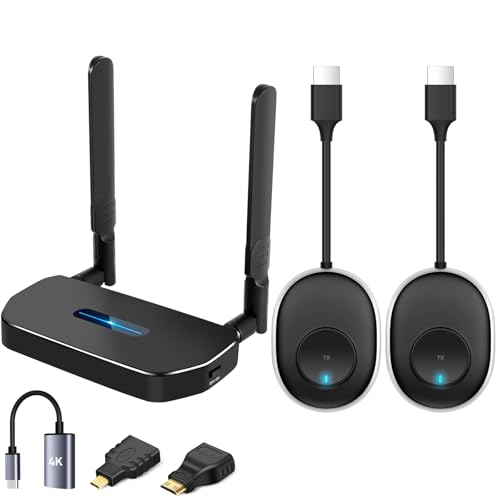
- Two transmitters switch between HDMI sources
- Pre-paired plug-and-play operation
- Up to 164 ft in open field; walls reduce range
Best For: Offices, meetings, and homes switching between two computers
Long-Range Production Pick
JM300PRO 4K Wireless Video System
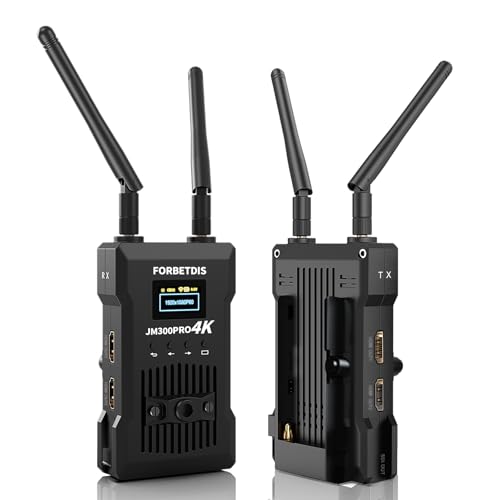
- 4K 30Hz transmission with 0.06-second listed delay
- Up to 1,000 ft in open conditions
- Supports one transmitter with up to four receivers
Best For: Events, streaming, camera monitoring, and long-distance links
Multi-Computer Switching
4-Transmitter Wireless HDMI Kit
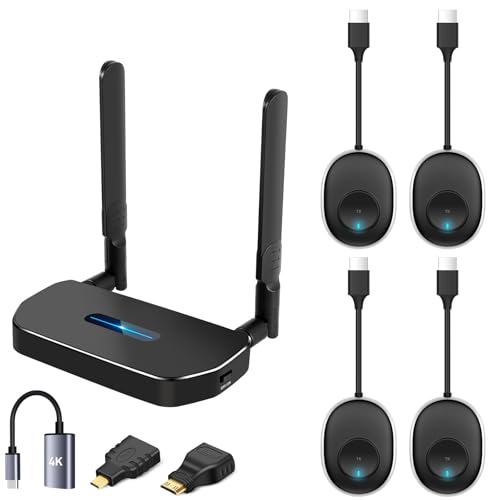
- Includes four transmitters for one-display source switching
- Can pair one receiver with up to eight transmitters
- Advertises 4K at 30Hz and plug-and-play setup
Best For: Meeting rooms and shared displays with multiple computers
Best for Multi-User Monitoring – Hollyland Pyro H 4K Wireless System
The Hollyland Pyro H is a strong option among 4k wireless video receivers for crews that need long-range monitoring and flexible connectivity. It supports 4K30 video over HDMI, dual-band 2.4GHz and 5GHz operation, smart channel scanning, and transmission to up to four receivers.
Best For: Film production, live streaming, ENG/EFP work, and multi-person monitoring setups.
Pros:
- Up to 1,300 feet of transmission range with 60ms latency in suitable conditions.
- Supports 4K30 video, HDMI input/output, and loopout.
- Can connect one transmitter to up to four receivers and supports Hollyview app monitoring.
- USB Video Class support enables plug-and-play computer live streaming.
Cons:
- The kit includes only one transmitter and one receiver, so additional receivers may be needed for larger teams.
- 4K transmission is limited to 24/25/30fps formats.
With smart channel selection, dual-band operation, and broad monitoring support, the Pyro H is built for collaborative shoots where range and expandability matter more than a compact presentation-only setup.
Best for Flexible Power and Display Options – SVBONY ST1 4K Wireless Kit
The SVBONY ST1 is a practical choice among 4k wireless video receivers for camera, projector, and presentation workflows. It combines 4K30 transmission, a claimed 1,000-foot range, selectable 5.8GHz channels, dual HDMI output on the receiver, and multiple power options.
Best For: DSLR or camera monitoring, presentations, projectors, streaming, and setups requiring flexible power.
Pros:
- Supports 4K video at 30fps with approximately 0.06-second latency.
- Receiver offers two HDMI outputs, while loopout supports local and remote viewing.
- Can use a DC 9–16V adapter, NP-F battery, or USB-C power.
- Supports one transmitter with up to four receivers and includes Android/iOS app monitoring.
Cons:
- NP-F battery is not included.
- Adding receivers may reduce the range, according to the supplied specifications.
- The system uses selectable 5.8GHz channels rather than the broader dual-band operation found on some alternatives.
The ST1 stands out for its OLED status screen, receiver-side display flexibility, and three power methods, making it especially useful for mobile shoots and installations where power conditions vary.
Best for HDMI and SDI Workflows – Hollyland Mars 4K Wireless System
For buyers comparing 4k wireless video receivers for professional production, the Hollyland Mars 4K offers both HDMI and SDI connectivity. It supports 4K30 over HDMI, HD formats over HDMI or SDI, decimal-point SDI frame-rate output, app monitoring, and a 450-foot line-of-sight range.
Best For: Professional camera crews, broadcast-style production, video switchers, and mixed HDMI/SDI systems.
Pros:
- Provides HDMI and SDI input/output for broader production compatibility.
- Supports 4K24/25/30 video over HDMI and 23.98/29.97/59.94 SDI output rates.
- Offers monitoring through HDMI, SDI, and iOS/Android apps.
- Includes a color LCD, joystick controls, multiple power options, and a durable metal shell.
Cons:
- Its 450-foot range is shorter than the Pyro H and SVBONY ST1 claims.
- The system uses H.264 encoding and lists 66ms latency.
- QC/PD charging and 5V/2A charging are not supported.
The Mars 4K is the most production-oriented option here when SDI compatibility and broadcast frame-rate support are priorities. Its shorter range is a reasonable tradeoff for the added interface flexibility.
Best for Presentations and Home Entertainment – Wireless HDMI 1080p60 Presentation Kit
This wireless HDMI kit is aimed at simple screen mirroring rather than professional 4K production. Although marketed as a 4K kit, the supplied notes specify video support up to 1080p at 60Hz, with plug-and-play transmission from laptops, cameras, smartphones, and other HDMI sources to a TV, projector, or monitor.
Best For: Business presentations, classroom use, home entertainment, and straightforward device-to-display mirroring.
Pros:
- Plug-and-play setup requires no driver or app.
- Supports up to 1080p60 video and 3D content.
- Claims transmission up to 165 feet in suitable conditions.
- Includes mini and USB-C HDMI adapters for compatibility with additional devices.
Cons:
- The supplied specifications list 1080p60 support, not 4K video transmission.
- Concrete walls or different floors can significantly reduce the stated range.
- The package does not include a 5V/2A charger.
This kit makes sense for buyers who value easy setup and broad everyday compatibility over true 4K delivery. It can also support up to eight transmitters with additional units, which is useful in meeting-room environments.
Professional 4K Link – Teradek Ace 750
For demanding 4k wireless video receivers workflows, the Teradek Ace 750 combines up to 4Kp30 10-bit HDR over HDMI with less than 0.01 seconds of latency. Its 6GHz transmission, automatic channel selection, and stated 750-foot range make it a strong option for professional monitoring and A/V setups.
Best For: Camera crews, live production, and professional wireless monitoring where low latency and HDR image quality matter.
Pros:
- Supports up to 4Kp30 10-bit HDR video over HDMI.
- Uses 6GHz transmission with 12 frequency options and auto channel selection.
- Pre-paired plug-and-play design with Bluetooth app control.
- Includes camera-friendly power options, including a D-Tap cable.
Cons:
- It is a premium, specialized system compared with basic wireless HDMI kits.
- The listed 750-foot range depends on operating conditions.
- A second AC adapter for studio or A/V setups is sold separately.
The Ace 750 is the most capability-focused choice in this group, particularly for users who need near-zero-delay monitoring and 4K HDR support. Its professional feature set may be more than necessary for casual home entertainment.
Everyday Wireless HDMI – 4K Decode 1080p Kit
This 4k wireless video receivers kit is designed for simple room-to-room HDMI sharing, decoding 4K content while outputting 1080p at 60Hz. Its dual-band 2.4GHz and 5.8GHz connection, LED display, and automatic pairing suit presentations, classrooms, home theaters, and other everyday setups.
Best For: Home offices, classrooms, conference rooms, and entertainment systems that need easy 1080p wireless display extension.
Pros:
- Decodes 4K input and outputs a smooth 1080p at 60Hz.
- Claims up to 360 feet in open spaces and up to 165 feet indoors.
- Supports mirror and extend display modes without apps, Wi-Fi, or software.
- One receiver can connect with up to eight transmitters, with up to three sets usable in one environment.
Cons:
- It does not output 4K video; output is limited to 1080p at 60Hz.
- Walls and other obstacles can reduce transmission distance and speed.
- Its range and feature claims are less suited to specialized professional production than the Teradek system.
Choose this kit when convenience and flexible display sharing are more important than native 4K output. The cooling design, status display, and broad HDMI-device compatibility add practical value for home and workplace use.
Long-Range 4K Transmission – Vrriis WL095P Wireless HDMI
For buyers comparing 4k wireless video receivers by range, the Vrriis WL095P stands out with a claimed 1,150-foot open-field transmission distance and support for UHD 4K at 30Hz. It is pre-paired for plug-and-play use and adds dual HDMI outputs plus a 3.5mm audio interface for flexible display and sound connections.
Best For: Large open spaces, home theaters, event setups, and multi-display installations that benefit from extended wireless reach.
Pros:
- Supports UHD 4K at 30Hz with synchronized audio.
- Claims up to 1,150 feet in an open field without interference.
- Receiver includes dual HDMI outputs and the system supports up to four receivers.
- Pre-paired setup and latency of less than 0.1 seconds simplify installation.
Cons:
- Walls, metal, brick, and glass can significantly reduce coverage.
- Adding receivers can shorten the wireless transmission distance.
- Its 0.1-second latency is higher than the Teradek Ace 750’s stated latency.
The WL095P is a practical long-distance option when 4K support and multi-display connectivity are priorities. Its advertised range is most relevant to open environments, so indoor buyers should plan for reduced coverage through walls and other obstructions.
Flexible Dual-Source Setup – 2-Transmitter 4K Wireless HDMI Kit
For shoppers comparing 4k wireless video receivers, this kit stands out for its included two-transmitter setup and simple source switching. It is designed for mirroring or extending content from computers and other HDMI devices to one display without apps, Bluetooth, or a Wi-Fi network connection.
Best For: Home offices, meetings, classrooms, and households that switch between two HDMI sources.
Pros:
- Includes two transmitters and one receiver for convenient source switching.
- Supports 720p and 1080p video, with the product listing also advertising 4K capability.
- Pre-paired plug-and-play design requires no additional app or Bluetooth connection.
- Dual-band 2.4GHz/5GHz operation and up to 164 feet of open-field range are advertised.
Cons:
- Concrete walls and multiple floors can reduce the stated range to approximately 3–5 meters.
- The supplied notes emphasize 1080p Full HD performance, so buyers should verify the exact 4K mode they need.
This is a practical choice when easy switching between two computers matters more than expanding to several receiving displays. Its real-world wireless range will depend heavily on the building layout and wall construction.
Long-Range Production Pick – JM300PRO 4K Wireless Video System
Among 4k wireless video receivers, the JM300PRO is aimed at longer-distance video links and more demanding production setups. It supports up to 4K at 30Hz, offers loop-out on the transmitter, and can be configured with multiple receivers for additional screens.
Best For: Live streaming, conferences, events, camera monitoring, and installations that need extended range.
Pros:
- Supports up to 4K 30Hz transmission with a listed 0.06-second delay.
- Advertises up to 1,000 feet of open-range transmission with external dual-gain antennas.
- Supports one transmitter to as many as four receivers for multiple displays.
- Offers USB-C, DC 9–16V, and compatible NP-F battery power options.
Cons:
- Real-time gaming may show the stated 0.06-second delay.
- Adding receivers can shorten the wireless transmission distance.
- NP-F batteries are supported but not included.
The JM300PRO is the most feature-oriented option here for event and monitoring work. Its advertised range is measured in open conditions, so obstacles, added receivers, and the installation environment should be considered before purchase.
Multi-Computer Switching – 4-Transmitter Wireless HDMI Kit
This kit is a useful option for buyers seeking 4k wireless video receivers with several HDMI sources feeding one screen. It includes four transmitters, supports one-key switching, and is advertised as capable of pairing one receiver with up to eight transmitters.
Best For: Meeting rooms, classrooms, control desks, and shared displays connected to multiple computers.
Pros:
- Includes four transmitters and supports up to eight transmitters with additional units.
- Advertises 4K at 30Hz as well as 720p and 1080p modes.
- Factory-paired plug-and-play setup needs no app, Bluetooth, or Wi-Fi connection.
- Supports screen mirroring and extending a different screen to the display.
Cons:
- The system is intended to share multiple computers to one TV or display, not multiple TVs.
- Each transmitter and receiver requires adequate 5V/1A-or-higher power to help prevent interruptions.
- The package does not include a 5V/2A charger.
Choose this model when source count is the priority. It can simplify switching among several computers, but buyers should plan for suitable USB power and remember that its receiver is designed around one shared display.
How We Picked These 4K Wireless Video Receivers
We focused on the specifications that most affect real-world use: maximum resolution and frame rate, HDMI or SDI compatibility, claimed transmission distance, latency, wireless band, receiver capacity, and setup simplicity. We also included a range of product types, from affordable presentation extenders to more advanced systems intended for cameras, monitors, studios, and live production.
Published range figures are best-case line-of-sight estimates. Walls, interference, antenna placement, network congestion, and the source and display hardware can reduce actual performance. Likewise, a receiver described as “4K” may accept or decode 4K while outputting 1080p, so check each specification carefully.
Quick Comparison
- Camera and field monitoring: Look first at latency, range, battery or power options, and support for your camera’s HDMI or SDI output.
- Professional production: Prioritize stable transmission, 10-bit HDR or SDI support, frame-rate compatibility, and dependable pairing.
- Presentations and home media: Plug-and-play HDMI kits can be easier to use than camera-focused systems, especially when 4K passthrough and simple switching matter.
- Multiple sources or screens: Multi-transmitter packages and systems supporting several receivers are useful for classrooms, events, and distributed monitoring.
Key Buying Factors for 4K Wireless Video Receivers
Resolution, Frame Rate, and Color
Confirm whether the system supports 4K at 30 frames per second, 1080p at 60 fps, or both. If you use HDR, gaming, or fast-moving footage, check color depth, HDR compatibility, and refresh-rate limitations rather than relying on the 4K label alone.
Latency and Reliability
Low latency is essential for camera operators, live presenters, and interactive content. A claimed delay of a few milliseconds may be suitable for monitoring, while higher latency can be acceptable for signage or casual viewing. Dual-band systems may handle interference better, but placement and line of sight still matter.
Inputs, Outputs, and Compatibility
Most consumer kits use HDMI, while professional options may add SDI. Check connector types, loop-out availability, HDCP behavior, audio support, and whether the transmitter works with your camera, laptop, projector, monitor, or capture device.
Range, Power, and Expansion
Choose based on the distance and obstacles in your actual room or venue, not just the advertised maximum. Also check USB, mains, or battery power requirements. If you plan to add screens or sources later, verify the supported receiver count and switching method.
Who Should Buy Which 4K Wireless Video Receivers?
Choose a professional HDMI or SDI system if you need consistent camera monitoring, 4K production features, lower latency, or dependable frame-rate support. Choose a plug-and-play HDMI kit for presentations, projectors, televisions, and straightforward point-to-point connections. Choose a multi-transmitter or multi-receiver package when several sources, displays, or viewing locations are part of the installation.
Before buying, match the complete signal path: source output, wireless transmitter capabilities, receiver output, and display input. That check prevents common surprises such as downscaled video, unsupported frame rates, missing audio, or insufficient range.