
The best 3D printers in 2026 make it easier to move from a digital model to a reliable physical part, whether you are learning at home, prototyping designs, or printing detailed multicolor projects.
This roundup compares beginner-friendly machines, fast CoreXY models, enclosed printers, and multicolor systems so you can choose the right balance of ease, speed, material support, and cost.
Best 10 3d Printers Picks for 2026
Best Beginner Pick

- Automatic calibration simplifies setup
- Fast, quiet FDM printing
- Optional AMS lite multi-color support
Best For: Beginners, families, and easy everyday printing
Best Fast Setup

- 600 mm/s maximum speed
- One-click automatic leveling
- Power-loss recovery and run-out sensing
Best For: Fast, accessible printing with common filaments
Best Enclosed Printer

- Enclosed design for advanced filaments
- 500 mm/s high-speed printing
- Automatic bed leveling and quick setup
Best For: Fast enclosed printing with broader material options
Best Multi-Material System

- Four independent toolheads
- Five-second automatic tool changes
- 270 mm cubed build volume
Best For: Advanced multi-color and mixed-material projects
Best Value Bundle

- Up to 250mm/s printing
- Auto leveling and Z-offset
- Includes four PLA colors
Best For: Beginners and hobbyists starting with multiple PLA colors
Premium Speed Pick

- Up to 600mm/s printing
- AMS 2 Pro multi-color support
- AI detection and auto calibration
Best For: Fast, automated multi-color and multi-material printing
Beginner-Friendly Pick
Ender 3 V3 SE Auto-Leveling Printer

- Simple, beginner-focused assembly
- Auto leveling and Z-offset calibration
- Quiet board and flexible build plate
Best For: First-time users printing everyday PLA, PETG, and TPU projects
Premium Multicolor Pick

- Up to 16-color printing with AMS
- 500mm/s speed and automatic leveling
- Enclosed design with broad filament support
Best For: Creators seeking fast, enclosed multicolor printing
Fast Prototyping Pick

- Up to 600mm/s CoreXY printing
- Four-color support with auto filament handling
- One-click leveling and flexible nozzle sizes
Best For: Rapid prototyping and efficient multicolor projects
Easy Automation Pick
ELEGOO Centauri Carbon 2 Combo
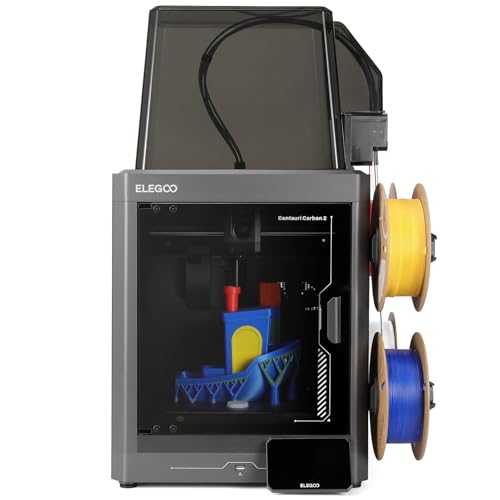
- Four-color CANVAS printing with smart detection
- Auto calibration, refill, and tangle detection
- 500mm/s CoreXY speed with material versatility
Best For: Hands-off multicolor printing and flexible materials
Best Beginner Pick – Bambu Lab A1
The Bambu Lab A1 is one of the most approachable 3d printers for beginners and kids, combining automatic calibration, a simple touchscreen, quiet operation, and high-speed FDM printing. Its active flow rate compensation is designed to help maintain smooth, consistent extrusion with less manual adjustment.
Best For: Beginners, families, and makers who want an easy-to-use printer with optional multi-color capability.
Pros:
- Automatic Z-offset and bed-leveling calibration simplify setup.
- High-speed printing with up to 10,000 mm/s² acceleration.
- Quiet operation, a simple touchscreen, and a quick-swap nozzle.
- Supports multi-color printing when paired with AMS lite.
Cons:
- AMS lite is required for multi-color printing and may need to be purchased separately.
- The supplied notes do not specify an enclosed design for advanced filaments.
The A1 is a strong choice when convenience matters more than extensive manual control. Choose the A1 Combo or add AMS lite if multi-color projects are a priority.
Best Fast Setup – FLASHFORGE Adventurer 5M
The FLASHFORGE Adventurer 5M is a fast CoreXY option for shoppers comparing 3d printers that can move from unboxing to printing quickly. One-click auto-leveling, vibration compensation, and a removable PEI plate are aimed at reducing setup time while supporting consistent first layers.
Best For: Makers who prioritize speed, quick setup, and straightforward printing with common materials.
Pros:
- Maximum speed of 600 mm/s with up to 20,000 mm/s² acceleration.
- Full-auto one-click leveling helps produce a reliable first layer.
- Filament run-out sensing and power-loss recovery reduce interruption concerns.
- Supports PLA, PETG, TPU, and selected carbon-fiber materials with the appropriate nozzle.
Cons:
- The open design is intended for open, well-ventilated environments.
- The 220 × 220 × 220 mm build volume may limit larger projects.
With its high advertised speed and fast preparation, the Adventurer 5M suits users who want to start printing with minimal calibration. Its open frame is worth considering when choosing a workspace and materials.
Best Enclosed Printer – Bambu Lab P1S
The Bambu Lab P1S is an enclosed FDM choice for shoppers comparing 3d printers with fast performance and broader material flexibility. It arrives ready to use, includes automatic bed leveling, and is designed to improve print performance with advanced filaments compared with an open-frame machine.
Best For: Makers who want an enclosed, high-speed printer for everyday projects and more demanding filament options.
Pros:
- Enclosed body supports printing with advanced filaments.
- Up to 500 mm/s speed and 20,000 mm/s² acceleration.
- Automatic bed leveling helps simplify reliable printing.
- Can support multi-color or multi-material printing with a Bambu Lab AMS.
Cons:
- AMS is required for the advertised multi-color capability.
- Carbon- and glass-fiber-reinforced polymers are not recommended.
- It is heavier than the smaller beginner-focused options in this roundup.
The P1S balances speed, enclosure benefits, and easy setup in a ready-to-use package. It is a practical step up for users who expect to experiment with materials beyond basic PLA while keeping automated bed leveling.
Best Multi-Material System – Snapmaker U1
The Snapmaker U1 stands out among 3d printers for true multi-color and multi-material work. Its four independent toolheads can switch in about five seconds, allowing users to combine rigid, flexible, and soluble-support materials while reducing the purging associated with conventional filament-changing systems.
Best For: Makers, workshops, and professionals creating complex multi-material prototypes, functional parts, and detailed models.
Pros:
- Four toolheads enable automatic multi-color and mixed-material printing.
- Five-second tool changes can reduce waiting and filament waste.
- Automatic calibration, vibration compensation, and extrusion tuning support reliable prints.
- Large 270 × 270 × 270 mm build volume and up to 500 mm/s CoreXY printing.
Cons:
- At 59 pounds, it is substantially heavier than the other listed printers.
- Its advanced toolhead system may be more capability than casual users need.
- The supplied notes do not identify an enclosed design.
The U1 is the specialized choice in this group, particularly when multi-material capability and reduced waste matter more than compactness. Its automatic controls, app support, and model library also help make a sophisticated platform more approachable.
Best Value Bundle – Ender 3 V3 SE Filament Bundle
Creality Ender 3 V3 SE 3D Printer Bundle with PLA Filament 4 Packs(Black+White+Red+Blue)
Check Price On AmazonIf you want one of the more accessible 3d printers for everyday projects, the Creality Ender 3 V3 SE bundle combines fast printing, automatic leveling, and four included PLA filament colors. Its direct-drive extruder also supports PLA, TPU, and PETG.
Best For: Beginners and hobbyists who want a ready-to-use starter package with multiple PLA colors.
Pros:
- Print speeds up to 250mm/s with 2500mm/s² acceleration.
- CR Touch auto leveling and automatic Z-offset reduce manual setup.
- Includes black, white, red, and blue PLA filament packs.
- Direct-drive extrusion supports PLA, TPU, and PETG.
Cons:
- The supplied notes do not specify the quantity of filament in each pack.
- Its feature set is aimed at practical hobby printing rather than advanced multi-color automation.
This bundle is a sensible choice when included materials matter as much as printer performance. Automatic leveling and a capable direct extruder make it approachable, while the included colors let you begin printing without immediately buying filament.
Premium Speed Pick – Bambu Lab P2S Combo
For shoppers comparing high-performance 3d printers, the Bambu Lab P2S Combo emphasizes speed, automation, and multi-color capability. The included AMS 2 Pro adds multi-material printing and filament drying, while AI detection and automatic calibration simplify the workflow.
Best For: Users who want very fast, automated printing with multi-color or multi-material capability.
Pros:
- Prints at speeds up to 600mm/s with precision-focused extrusion control.
- AMS 2 Pro supports multi-color and multi-material printing.
- Built-in filament drying reaches up to 65°C.
- Includes AI failure detection, automatic calibration, and quick-swap nozzles.
Cons:
- The P2S printer alone does not support multi-color printing; the Combo is required.
- At 46.3 pounds, it is substantially heavier than the listed Ender 3 V3 SE models.
The P2S Combo is the strongest fit for buyers prioritizing speed and a streamlined workflow over basic entry-level pricing. Its AMS 2 Pro and smart automation add flexibility, while adaptive airflow is designed to accommodate a wider range of filament needs.
Beginner-Friendly Pick – Ender 3 V3 SE Auto-Leveling Printer
The Creality Ender 3 V3 SE is one of the more approachable 3d printers for first-time users who want a straightforward setup and dependable everyday features. Auto leveling, a direct-drive extruder, and a flexible build plate reduce common beginner frustrations.
Best For: New users seeking an easy-to-assemble printer for PLA, PETG, and TPU projects.
Pros:
- Assembles in a few simple steps and includes CR Touch auto leveling.
- Prints at up to 250mm/s with 2500mm/s² acceleration.
- Sprite Direct Drive Extruder supports PLA, PETG, and TPU.
- Silent 32-bit mainboard and flexible PC spring steel plate improve usability.
Cons:
- This listing does not include the four-color filament bundle supplied with the other Ender 3 V3 SE option.
- It is a single-printer setup without the P2S Combo’s multi-color system.
Choose this version when simple operation and easy print removal are your priorities. It offers the same headline speed as the bundled Ender option, but its emphasis on beginner-friendly setup and quiet operation makes it particularly suitable for home workspaces.
Premium Multicolor Pick – Bambu Lab P1S Combo
The Bambu Lab P1S Combo is one of the most capable 3d printers for creators who want fast, enclosed, multicolor printing. Its included AMS supports multicolor and multimaterial workflows, while automatic bed leveling and a 15-minute setup help simplify everyday use.
Best For: Creators who want fast, enclosed printing with broad material support and up to 16 colors.
Pros:
- Supports up to 16 colors when connected to the Bambu Lab AMS.
- Prints at speeds up to 500mm/s with 20,000mm/s² acceleration.
- Enclosed design supports advanced filaments and improves print performance.
- Automatic bed leveling and quick setup reduce hands-on preparation.
Cons:
- The AMS is required for the advertised multicolor capability.
- Carbon- and glass-fiber-reinforced polymers are not recommended.
- At 40.8 pounds, it is relatively heavy to reposition.
The P1S Combo stands out for combining high speed, enclosure benefits, and expansive multicolor potential. It is a strong choice when convenience and creative flexibility matter more than a compact footprint.
Fast Prototyping Pick – FLASHFORGE AD5X
The FLASHFORGE AD5X is a practical choice among 3d printers for rapid prototyping and efficient multicolor production. Its CoreXY design reaches up to 600mm/s, while one-click auto leveling, automatic filament handling, and remote monitoring make operation more straightforward.
Best For: Users who prioritize high-speed four-color printing, flexible nozzle options, and convenient monitoring.
Pros:
- Supports up to four colors simultaneously.
- CoreXY motion system delivers speeds up to 600mm/s and 20,000mm/s² acceleration.
- One-click auto leveling, power-loss resume, and automatic filament feeding simplify use.
- Supports nozzle sizes from 0.25mm to 0.8mm for detail or faster large-model printing.
Cons:
- Its multicolor capacity is limited to four colors.
- The 220 x 220 x 220mm build volume may limit larger projects.
- Some nozzle sizes are optional upgrades rather than standard equipment.
With a high advertised speed and useful automation, the AD5X is well suited to users balancing output and control. Its nozzle range also gives it flexibility for both detailed models and sturdier, faster prints.
Easy Automation Pick – ELEGOO Centauri Carbon 2 Combo
The ELEGOO Centauri Carbon 2 Combo is designed for users who want automated multicolor printing without a complicated workflow. Among 3d printers, it emphasizes convenience with CANVAS color switching, automated calibration and monitoring, plus auto refill and tangle detection.
Best For: Users who want hands-off four-color printing, broad material versatility, and an integrated workflow.
Pros:
- CANVAS supports four-color printing with instant switching and smart filament detection.
- Auto refill and tangle detection help maintain continuous multicolor printing.
- Automated calibration and monitoring support a load-and-print workflow.
- CoreXY construction reaches up to 500mm/s with 20,000mm/s² acceleration.
Cons:
- It is a large, heavy printer at 42.6 pounds with listed dimensions of 18.9 x 19.7 x 29.3 inches.
- Multicolor features depend on the CANVAS system and integrated ecosystem.
- The supplied notes do not specify its build volume or exact supported materials.
The Centauri Carbon 2 Combo focuses on reducing intervention from setup through monitoring. It is an appealing fit for makers who value automated color management and material flexibility in a complete ecosystem.
How We Picked the Best 3d Printers
We focused on practical ownership rather than headline specifications alone. The selected 3d Printers represent several common buying paths: simple first printers, faster enclosed machines, affordable open-frame models, and multicolor systems with automatic material handling or multiple toolheads.
We considered setup requirements, leveling and calibration features, print speed, build volume, extruder design, enclosure options, material compatibility, software workflow, and the likely cost of accessories or consumables. Product positioning also matters: a printer that is excellent for a beginner may not be the best choice for demanding engineering materials or high-volume production.
Quick Comparison
| Type | Best suited to | What to look for |
|---|---|---|
| Open-frame beginner printer | Learning and basic PLA projects | Automatic leveling, straightforward controls, and accessible replacement parts |
| Fast CoreXY printer | Frequent prototyping and shorter print times | Rigid motion system, direct-drive extrusion, and dependable calibration |
| Enclosed printer | Cleaner operation and broader material use | Temperature management, ventilation strategy, and chamber access |
| Multicolor printer | Signs, models, educational projects, and visual prototypes | Color-change waste, material compatibility, loading workflow, and software support |
| Multi-toolhead printer | Independent materials or colors | Tool-change speed, nozzle alignment, maintenance, and toolhead cost |
Key Buying Factors for 3d Printers
Ease of Setup and Calibration
Automatic bed leveling and a guided first-run process reduce the learning curve, but they do not eliminate the need for a clean build plate, correct first-layer settings, and occasional maintenance. Beginners should prioritize a reliable workflow over maximum advertised speed.
Build Volume and Print Speed
Check the actual build dimensions against the objects you plan to make. High-speed printing is most useful when the printer can maintain quality through effective motion control, cooling, and extrusion. Large models may still require long print times regardless of the machine’s peak speed.
Materials and Temperature Capability
PLA is the easiest starting material. PETG adds durability and heat resistance, while ABS, ASA, nylon, and composite filaments generally benefit from an enclosure, a heated build surface, and a suitable hotend. Confirm the printer’s temperature limits and recommended materials before buying specialty filament.
Single-Color Versus Multicolor Printing
Multicolor systems add convenience and creative flexibility, but they can increase print time, filament use, waste, software complexity, and maintenance. If you mostly print functional parts in one material, a simpler single-extruder model may offer better value.
Safety, Noise, and Maintenance
Consider where the printer will operate. Enclosures can help contain drafts and improve temperature control, while open-frame designs are easier to access but expose moving and hot components. Look for manageable noise levels, clear ventilation needs, replacement-part availability, and an active support ecosystem.
Who Should Buy Which 3d Printers?
First-time users and families: Choose a beginner-oriented printer with automatic leveling, a simple interface, and widely available PLA. An open-frame model can be a cost-effective way to learn, provided it is placed safely and supervised around children.
Speed-focused makers: A fast CoreXY printer with automatic calibration and direct-drive extrusion is a better fit for repeated prototypes and larger project queues.
Multicolor creators: Choose an integrated multicolor or multi-toolhead system if color changes are central to your work. Compare waste, tool-change behavior, supported materials, and the quality of the companion software.
Advanced hobbyists: An enclosed printer with stronger temperature control and broader filament support is preferable for functional parts and demanding materials. Budget for filament storage, spare nozzles, build plates, and routine maintenance.