
Finding one of the best 3D printers under $300 no longer means settling for a frustrating first machine. Today’s budget models can offer automatic leveling, direct-drive extrusion, fast print speeds, and simple setup for beginners.
We selected 10 options across FDM and resin printing, compact starter machines, larger workhorses, and feature-rich models. Use the guide below to match print quality, materials, speed, and ease of use to your projects.
Best 10 3d Printers Under 300 Picks for 2026
Best Overall

- Automatic calibration simplifies setup
- Fast, quiet printing with flow compensation
- Supports optional AMS lite multi-color printing
Best For: Beginners and creators wanting an easy, capable printer
Best for Speed

- Prints at speeds up to 600mm/s
- One-click auto leveling supports first-layer consistency
- Includes recovery features for filament and power interruptions
Best For: Fast prototyping and everyday material use
Best Compact Bundle

- Includes an LED Lamp Kit
- Automatic calibration supports easy setup
- Compact and quiet with app and model-library access
Best For: Beginners and creative projects in smaller spaces
Best Value Beginner Pick

- Up to 250mm/s printing speed
- Auto leveling and Z-offset calibration
- Direct-drive extrusion supports PLA, PETG, and TPU
Best For: New users printing everyday models and functional parts
Best Beginner Mini Pick
TINA2 Fully Assembled 3D Printer
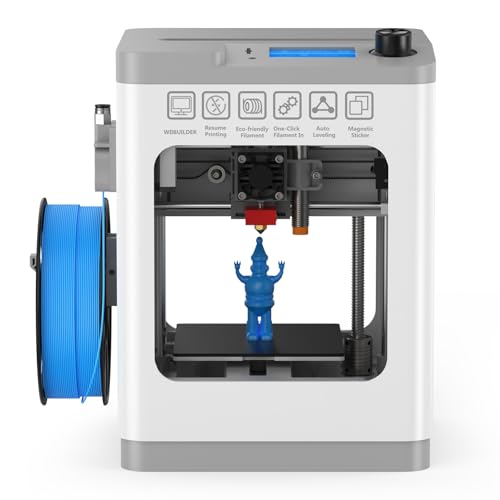
- Fully assembled with sample filament and model files
- Auto bed leveling and power-loss recovery
- Compact design with flexible slicer support
Best For: Beginners, children, and small workspaces
Best Detail-Focused Resin Pick
ELEGOO Mars 5 Ultra Resin 3D Printer
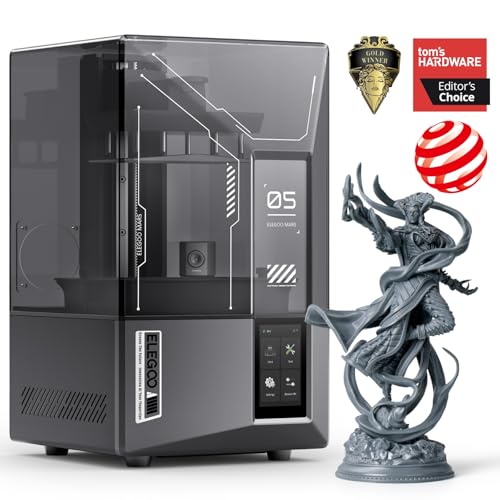
- 9K LCD with 18 μm XY resolution
- Up to 150 mm/h printing with tilt release
- AI camera and smart resin-monitoring sensors
Best For: Detailed resin projects and multi-printer workflows
Best Connected Family Pick
Entina Tina2C Wi-Fi 3D Printer

- Guided setup with first print in as fast as 8 minutes
- App, Wi-Fi, and TF-card printing options
- STEM tools, auto leveling, and compact 3.9-inch build volume
Best For: Families, students, and beginner home projects
Best High-Speed Pick

- Automatic one-click leveling
- CoreXY design with up to 600mm/s speed
- Tool-free quick-swap nozzle
Best For: Fast, convenient printing for beginners and experienced makers
Best Overall – Bambu Lab A1
For shoppers comparing 3d printers under 300, the Bambu Lab A1 stands out as a ready-to-use option with fast printing, automatic calibration, and a beginner-friendly interface. Its active flow-rate compensation and quiet operation support consistent results with less setup.
Best For: Beginners, families, and creators who want an easy-to-use printer with optional multi-color capability.
Pros:
- Automatic calibration handles Z-offset and bed leveling.
- High-speed printing with up to 10,000 mm/s² acceleration.
- Quiet operation, simple touchscreen, and quick-swap nozzle.
- Supports multi-color printing when paired with AMS lite.
Cons:
- AMS lite is required for multi-color printing and may need to be purchased separately.
- The product weighs 22 pounds and has a relatively large footprint.
The A1 is a strong all-around choice for buyers who value automation and convenience. Choose the A1 Combo or add AMS lite if multi-color projects are a priority.
Best for Speed – FLASHFORGE Adventurer 5M
Among 3d printers under 300, the FLASHFORGE Adventurer 5M is aimed at buyers who want fast production without extensive manual tuning. Its one-click auto leveling, Core XY motion system, and vibration compensation are designed to reduce setup time and improve print consistency.
Best For: Fast prototyping and everyday printing with PLA, PETG, or TPU.
Pros:
- Maximum speed of up to 600mm/s with high acceleration.
- One-click full-auto leveling helps produce a reliable first layer.
- Vibration compensation helps reduce ghosting.
- Power-loss recovery and filament run-out detection add convenience.
Cons:
- Its open design is best used in an open, well-ventilated environment.
- Some specialty materials require the optional 0.6mm nozzle.
The Adventurer 5M is a practical pick when speed and low waiting time matter most. Its 220 x 220 x 220mm build volume suits many household and prototyping projects.
Best Compact Bundle – Bambu Lab A1 mini
The Bambu Lab A1 mini is a compact choice among 3d printers under 300, particularly for beginners who want a simple setup and an included creative accessory. The LED Lamp Kit expands its use beyond standard models, while automatic calibration and app support make everyday printing approachable.
Best For: Beginners, small workspaces, and DIY lighting, décor, toy, or gift projects.
Pros:
- Includes an LED Lamp Kit for compatible lighting projects.
- Automatic calibration helps simplify the first print.
- Access to MakerWorld models and Bambu Handy app management.
- Compact, quiet, and designed for everyday creative use.
Cons:
- The compact format may be less suitable for larger models.
- The included lamp functionality depends on compatible printed models.
This bundle is a convenient entry point for users who want guided projects rather than a purely hardware-focused purchase. It is especially appealing for home décor and personalized gifts.
Best Value Beginner Pick – Creality Ender 3 V3 SE
The Creality Ender 3 V3 SE is a practical contender among 3d printers under 300, combining straightforward assembly with automatic leveling and a direct-drive extruder. Its stable motion system and flexible build plate are useful for routine prototypes, functional parts, and general home projects.
Best For: New users who want a capable, easy-to-assemble printer for PLA, PETG, and TPU.
Pros:
- Print speeds reach up to 250mm/s.
- CR Touch auto leveling and automatic Z-offset calibration simplify setup.
- Sprite direct-drive extruder supports PLA, PETG, and TPU.
- Silent mainboard and flexible PC spring steel plate improve convenience.
Cons:
- It is an open printer and lacks the enclosed design some materials may benefit from.
- The 15 x 19.6 x 15-inch footprint requires dedicated space.
The Ender 3 V3 SE offers a balanced feature set for beginners without making the workflow unnecessarily complicated. Its automatic leveling and reliable filament feeding make it a sensible everyday starter printer.
Best Beginner Mini Pick – TINA2 Fully Assembled 3D Printer
If you want one of the most approachable 3d printers under 300, the fully assembled TINA2 Basic keeps setup simple. Auto bed leveling, a sample PLA roll, included model files, and a compact design make it a practical starting point for home, school, or office use.
Best For: Beginners, children, and shoppers seeking a compact starter printer with straightforward controls.
Pros:
- Fully assembled and includes sample PLA filament plus a Micro SD card with model files.
- Auto bed leveling and pause-and-resume printing reduce common beginner frustrations.
- Supports PLA, PLA Pro, and TPU, with compatibility across several popular slicers.
- Compact body and removable magnetic build plate suit smaller workspaces.
Cons:
- The compact design has limited build space for larger projects.
- Printing relies on TF card or USB connections rather than the app and Wi-Fi features found on some newer models.
The TINA2 is a sensible choice when ease of setup and low-effort operation matter more than a large print volume. Its open-source workflow also leaves room to grow as beginners take on custom designs.
Best Detail-Focused Resin Pick – ELEGOO Mars 5 Ultra Resin 3D Printer
For shoppers comparing 3d printers under 300 who prioritize fine detail, the ELEGOO Mars 5 Ultra is a resin model built around a 9K monochrome LCD and 18 μm XY resolution. Its fast tilt-release system, AI camera, and resin-monitoring sensors add useful features for detailed, productivity-focused printing.
Best For: Makers who want highly detailed resin prints and convenient monitoring features.
Pros:
- 9K LCD and 18 μm XY resolution are designed to reproduce intricate details.
- Print speeds reach up to 150 mm/h, with selectable fast and slow modes.
- AI camera can monitor for issues such as empty plates and model warping.
- Supports Wi-Fi control of multiple Mars 5 Ultra printers from one device.
Cons:
- Resin printing is a more specialized workflow than the filament-based options in this roundup.
- AI detection results can vary with the environment, models, and resin types.
- Its larger, heavier body is less convenient for highly portable setups.
The Mars 5 Ultra stands out when print detail and speed are the deciding factors. Its smart sensors and camera can help reduce avoidable failures, while Wi-Fi cluster printing is especially useful for users managing more than one compatible printer.
Best Connected Family Pick – Entina Tina2C Wi-Fi 3D Printer
The Entina Tina2C is a strong option among 3d printers under 300 for families and first-time users who want guided app control. Its Poloprint Cloud features, Wi-Fi or TF-card printing, auto leveling, and compact footprint make it easy to move from setup to small creative and STEM projects.
Best For: Families, students, and beginners who want app-guided printing and educational project ideas.
Pros:
- Fully assembled and designed to start a first print in as fast as 8 minutes.
- Poloprint Cloud provides AI-powered search, photo-to-print tools, and 25+ creative modules.
- Offers 2.4G Wi-Fi printing as well as offline TF-card printing.
- Auto leveling, power-loss recovery, a flexible build plate, and quick-swap printhead simplify ownership.
Cons:
- The 3.9 × 3.9 × 3.9-inch print volume limits larger models.
- Its app-centered features may be less appealing to users who prefer a basic offline workflow.
- It is intended for compact creative builds rather than large-format printing.
The Tina2C is especially compelling for households and classrooms that value guided learning over a bare-bones printer experience. Wi-Fi, app tools, and beginner-friendly maintenance make it a convenient choice for frequent small projects.
Best High-Speed Pick – FLASHFORGE AD5M
If you want one of the more capable 3d printers under 300, the FLASHFORGE AD5M combines automatic calibration, a sturdy CoreXY design, and fast printing in a beginner-friendly package. Its 220 x 220 x 220 mm build volume suits everyday models, prototypes, and creative projects.
Best For: Beginners and experienced users who want fast, low-maintenance printing with remote monitoring options.
Pros:
- One-click automatic leveling helps simplify first-layer setup.
- All-metal CoreXY construction supports high-speed, low-noise operation.
- Quick-release nozzles can be swapped without tools in about three seconds.
- Power-loss recovery and a flexible double-sided PEI plate add convenience.
Cons:
- The 220 mm cubed build volume may limit larger projects.
- Remote management features depend on using the supported slicer or app.
The AD5M is a strong choice when speed and easy maintenance matter. Automatic calibration, quick nozzle changes, and print-resume functionality reduce routine interruptions, while the CoreXY frame provides a solid foundation for detailed prints.
Best Value Workhorse – ELEGOO Neptune 3 Pro
The ELEGOO Neptune 3 Pro is a practical option among 3d printers under 300, offering a generous 225 x 225 x 280 mm build volume and helpful setup features. Pre-assembled main parts, auto leveling, and a direct-drive extruder make it suitable for routine printing across several common materials.
Best For: Makers who want a dependable, spacious printer for PLA, TPU, PETG, and ABS projects.
Pros:
- 36-point auto bed leveling simplifies first-layer preparation.
- Dual-gear direct-drive extrusion supports consistent filament feeding.
- Supports PLA, TPU, PETG, and ABS.
- Power-loss resume and filament runout detection help protect longer prints.
Cons:
- Its listed print speed is not positioned as a high-speed CoreXY alternative.
- The printer’s 22-pound weight and 23-inch length require a dedicated workspace.
For buyers prioritizing versatility and build space over headline speed, the Neptune 3 Pro offers a balanced feature set. Its dual lead screws, silent stepper motors, and upgraded cooling-focused nozzle system support steady, repeatable everyday printing.
Best Expandable Speedster – Creality K2 SE
The Creality K2 SE stands out among 3d printers under 300 for its lightweight CoreXY system, up to 500 mm/s printing, and rigid metal frame. It also provides a path to multicolor printing through the separately sold Creality CFS, making it a flexible option for both functional parts and creative models.
Best For: Users who want fast, stable printing now and the option to add multicolor capability later.
Pros:
- Up to 500 mm/s speed with vibration sensing and input shaping.
- Solid die-cast aluminum construction helps reduce frame flex.
- Automatic leveling and a five-minute assembly support a beginner-friendly setup.
- Direct-drive extrusion includes a quick-swap nozzle and filament runout sensor.
Cons:
- The Creality CFS multicolor system is sold separately.
- Its 220 x 215 x 245 mm build area is not the largest in this group.
The K2 SE is appealing if rapid printing and future expansion are central to your buying decision. Automatic setup features reduce initial friction, while the rigid frame, direct-drive extruder, and optional CFS compatibility give it room to grow with more advanced workflows.
How We Picked the Best 3d Printers Under 300
We compared these printers by looking at setup difficulty, print quality, build volume, leveling and calibration systems, print speed, extruder design, material compatibility, connectivity, and overall value. We also considered whether each model makes sense for its intended user, from children and first-time makers to hobbyists who want faster or more detailed results.
The selection includes both FDM printers, which use plastic filament and are generally easier to maintain, and resin printers, which can produce highly detailed models but require more ventilation, cleaning, and post-processing.
Quick Comparison
| Best For | What to Prioritize | Printer Types to Consider |
|---|---|---|
| First-time users | Automatic leveling, guided setup, and dependable software | Bambu Lab A1 mini, TINA2, Entina Tina2C |
| Fast everyday printing | High motion speed, reliable calibration, and direct drive | FLASHFORGE Adventurer 5M, AD5M, Creality K2 SE |
| Larger functional parts | Build volume, sturdy frame, and broad filament support | Bambu Lab A1, Ender 3 V3 SE, Neptune 3 Pro |
| Fine model detail | Resin resolution and controlled post-processing | ELEGOO Mars 5 Ultra |
Key Buying Factors for 3d Printers Under 300
FDM or Resin
FDM is the better starting point for most households because filament is cleaner to handle and suitable for prototypes, toys, organizers, and practical parts. Resin is preferable for miniatures and intricate surfaces, but it requires gloves, washing, curing, and appropriate ventilation.
Build Volume and Materials
Check the maximum print dimensions before buying. A compact printer is easier to place but limits larger models. Also confirm which filaments the printer supports. PLA is the easiest option, while PETG and tougher materials may require a heated bed, enclosed chamber, or higher-temperature hotend.
Automation and Reliability
Automatic bed leveling, calibration routines, filament runout detection, and power-loss recovery reduce failed prints and make ownership easier. These features matter especially for beginners, because manual adjustments can otherwise become the most difficult part of the learning curve.
Speed and Noise
Advertised maximum speed is not the same as typical print speed. Look for a rigid frame, stable motion system, and good cooling. If the printer will sit in a bedroom, office, or classroom, also check user feedback about fan and stepper-motor noise.
Who Should Buy Which 3d Printers Under 300?
Choose the Bambu Lab A1 mini, TINA2, or Entina Tina2C if you want a compact, approachable first printer with minimal assembly. The Bambu Lab A1 is a stronger choice when you need more room for larger projects while retaining beginner-friendly automation.
For users who value rapid prototyping, the FLASHFORGE Adventurer 5M, FLASHFORGE AD5M, or Creality K2 SE are worth considering for their high-speed designs and automated calibration. The Ender 3 V3 SE and ELEGOO Neptune 3 Pro suit buyers who want a capable traditional FDM platform for learning, upgrades, and functional prints.
Finally, choose the ELEGOO Mars 5 Ultra if surface detail matters more than convenience and you are prepared for resin safety and cleanup. Before purchasing, confirm current pricing, included accessories, replacement-part availability, and the manufacturer’s recommended materials.