
Architectural models demand more than fast print speeds. Fine façade details, clean edges, reliable dimensional accuracy, and a build area suited to your project scale all matter when turning CAD files into convincing physical models.
We’ve selected 10 capable 3D printers for architectural models, covering approachable desktop FDM machines, fast CoreXY platforms, multi-color systems, and large-format printers for substantial site or building studies.
Best 10 3d Printers for Architectural Models Picks for 2026
Best High-Speed Enclosed Pick

- Up to 500 mm/s printing speed
- Enclosed design for advanced filaments
- AMS enables up to 16-color printing
Best For: Fast architectural prototypes and enclosed-material workflows
Best Quiet Filtered Workhorse

- Up to 600 mm/s CoreXY printing
- HEPA13 and carbon filtration
- Multiple nozzle sizes for detail or speed
Best For: Shared studios, classrooms, and flexible model production
Best Beginner-Friendly Choice

- Full-auto calibration
- Fast, quiet precision printing
- AMS lite supports multi-color output
Best For: Beginners and students creating architectural study models
Best Multi-Color Production Pick

- Up to four-color printing
- 600 mm/s CoreXY performance
- 0.25–0.8 mm nozzle options
Best For: Color-coded models, rapid prototypes, and batch production
Best All-Around Choice

- Up to 600 mm/s printing with precision-focused motion and flow control
- AMS 2 Pro adds multi-color printing and filament drying
- Automatic calibration and AI failure detection simplify operation
Best For: Detailed architectural models with convenient multi-color capability
Best for Oversized Models
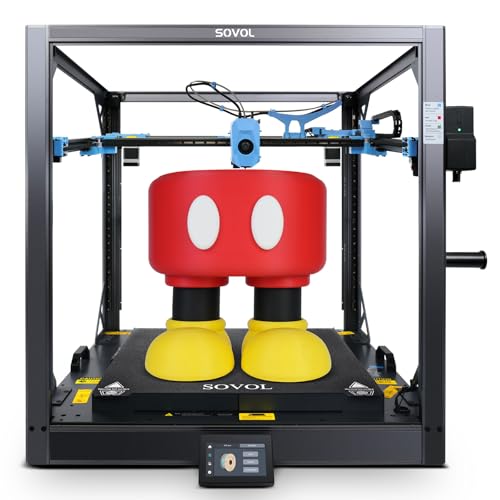
- 500 x 500 x 500 mm build volume for very large models
- CoreXY system reaches up to 700 mm/s with high acceleration
- Automatic bed calibration and remote camera monitoring
Best For: Large architectural prototypes and oversized model components
Best for Engineering Materials

- 320 x 320 x 300 mm build volume for models and prototypes
- 370 °C extrusion and 65 °C heated chamber support advanced filaments
- Optional QIDI BOX enables up to 16-color multi-material printing
Best For: Studios combining architectural models with durable prototypes
Industrial Multicolor Pick

- Four independent extruders for clean multicolor work
- 65°C heated chamber for engineering materials
- Enclosed CoreXY design with HEPA13 filtration
Best For: Studios making detailed multicolor models and durable prototypes
Large-Format Production Pick

- 400 × 400 × 400 mm build volume
- WLAN controls for multi-printer workflows
- 64-point leveling with automatic Z-offset
Best For: Large architectural models, batches, and print farms
Automated Color-and-Materials Pick

- CFS supports up to 16 colors with expansion
- 350mm cubed build volume for larger models
- AI cameras and heated chamber support monitored printing
Best For: Color-rich architectural models and advanced material workflows
Best High-Speed Enclosed Pick – Bambu Lab P1S
For architectural models that benefit from fast production and a controlled printing environment, the Bambu Lab P1S combines a fully enclosed design, automatic bed leveling, and speeds up to 500 mm/s. It is ready to use in about 15 minutes and supports common materials such as PLA, PETG, TPU, PVA, PET, ABS, and ASA.
Best For: Designers and studios producing detailed architectural prototypes quickly, especially when working with enclosed-compatible filaments.
Pros:
- High-speed printing with up to 500 mm/s speed and 20,000 mm/s² acceleration.
- Fully enclosed body improves print performance with advanced filaments.
- Automatic bed leveling and quick setup simplify operation.
- Optional AMS support enables up to 16-color or multi-material printing.
Cons:
- AMS is required for multi-color or multi-material printing.
- Carbon- or glass-fiber-reinforced polymer is not recommended.
- Its 38.9-pound weight may make relocation less convenient.
The P1S is a strong all-around choice for architectural models when speed, enclosure, and dependable first layers matter. Add the AMS if color-coded presentation models are part of your workflow.
Best Quiet Filtered Workhorse – FlashForge 5M Pro
The FlashForge 5M Pro is a practical option for architectural models in shared studios, classrooms, or home workspaces. Its enclosed build area, quiet modes, automatic leveling, dual filtration, and interchangeable nozzle sizes support both fine detail and more efficient larger prints.
Best For: Model makers who want quieter operation, air filtration, remote monitoring, and flexibility across different filament types.
Pros:
- Prints at up to 600 mm/s with a CoreXY structure.
- Automatic leveling helps produce a consistent first layer.
- HEPA13 and activated carbon filtration address particulate matter and VOCs.
- Supports 0.25, 0.4, 0.6, and 0.8 mm nozzles for detail or efficiency.
Cons:
- Its 33-pound weight is substantial for a compact workspace.
- Advanced features may be more than needed for simple PLA models.
- Multi-printer monitoring depends on the supported slicer and app ecosystem.
With quiet operation, filtration, and broad material and nozzle support, the 5M Pro suits architectural teams balancing presentation quality with a comfortable shared work environment.
Best Beginner-Friendly Choice – Bambu Lab A1
For newcomers choosing 3d printers for architectural models, the Bambu Lab A1 emphasizes simple operation without giving up speed or accuracy. Full-auto calibration, active flow-rate compensation, quiet motor control, and a quick-swap nozzle make it approachable for repeated model-making tasks.
Best For: Beginners, students, and small design teams printing PLA-based architectural studies with minimal manual calibration.
Pros:
- 10,000 mm/s² acceleration supports fast, precise printing.
- Full-auto calibration handles Z-offset and bed-leveling tasks.
- Active flow-rate compensation helps maintain smooth extrusion.
- AMS lite support enables multi-color printing when purchased separately or in a combo.
Cons:
- AMS lite is required for multi-color printing.
- The supplied notes do not identify an enclosed design for advanced filaments.
- Its larger footprint may need dedicated workspace.
The A1 is an accessible starting point for architectural model studies, particularly where ease of use and quiet operation are more important than enclosed-material capability.
Best Multi-Color Production Pick – FlashForge AD5X
The FlashForge AD5X is designed for efficient architectural model production, pairing a CoreXY platform with speeds up to 600 mm/s, 1-click auto leveling, and support for up to four colors. Its nozzle range also lets you prioritize fine miniature details or faster printing for larger structural pieces.
Best For: Designers producing color-coded architectural models, rapid prototypes, and batches of models with varied detail requirements.
Pros:
- Supports up to four colors simultaneously.
- CoreXY motion system reaches 600 mm/s with 20,000 mm/s² acceleration.
- 300°C direct-drive extruder supports varied printing needs.
- 0.25 to 0.8 mm nozzle options cover miniature detail through faster larger prints.
Cons:
- Build volume is limited to 220 × 220 × 220 mm.
- Only the 0.4 mm nozzle is supplied pre-installed; other sizes are optional upgrades.
- Multi-color output may add workflow complexity compared with single-color printing.
The AD5X stands out when color separation and production efficiency are priorities. Its flexible nozzle options make it especially useful for switching between presentation details and larger architectural components.
Best All-Around Choice – Bambu Lab P2S Combo
For most architectural models, the Bambu Lab P2S Combo balances fast printing, precise detail, and an approachable setup. Its automatic calibration, AI failure detection, and multi-color capability make it a practical option for producing presentation models and detailed study pieces.
Best For: Designers and students who want fast, detailed architectural models with convenient multi-color printing.
Pros:
- Prints at speeds up to 600 mm/s while emphasizing sharp corners and consistent layers.
- Automatic calibration, quick-swap nozzles, and AI failure detection simplify setup and operation.
- AMS 2 Pro supports multi-color and multi-material printing with filament drying up to 65 °C.
- Adaptive airflow can help preserve overhang quality and support a range of filament types.
Cons:
- The printer itself does not support multi-color printing; the Combo version is required.
- Its 46.3-pound weight and 18 x 22 x 18-inch footprint require dedicated workspace.
The P2S Combo is a strong fit when architectural model work demands a mix of speed, clean detail, and workflow convenience. Choose it over a larger-format machine when typical model components fit its build space and color flexibility is valuable.
Best for Oversized Models – Sovol SV08 MAX
The Sovol SV08 MAX is built for architectural models that exceed the limits of standard desktop printers. Its 500 x 500 x 500 mm print space can handle large prototypes and complex forms in fewer pieces, while CoreXY motion and automatic bed calibration support high-speed production.
Best For: Architecture studios and makers printing large-scale models, oversized components, or full-size prototypes.
Pros:
- Large 500 x 500 x 500 mm build volume reduces the need to split oversized models.
- Up to 700 mm/s speed, 40,000 mm/s² acceleration, and a 50 mm³/s high-flow nozzle help shorten print times.
- Eddy current scanning and pressure-sensing touch points automate bed calibration.
- Built-in HD camera supports remote monitoring, time-lapse recording, and failure-detection integration.
Cons:
- Its 28 x 27.6 x 29.5-inch footprint and 86.8-pound weight demand substantial space and a sturdy setup.
- The heated chamber module for expanded high-temperature printing is an optional purchase.
- Multi-color printing is not identified among the supplied features.
For architectural models where scale is the priority, the SV08 MAX offers substantially more room than typical desktop options. Its large enclosure and industrial-style capabilities are best suited to users who can accommodate the machine and need fewer seams in large prints.
Best for Engineering Materials – QIDI Plus5 Combo
The QIDI Plus5 Combo suits architectural model workflows that also involve durable prototypes or technically demanding materials. Its 320 x 320 x 300 mm build volume, heated chamber, and high-temperature extrusion system support both detailed presentation pieces and functional components.
Best For: Professional users who need architectural models alongside strong, heat-resistant prototypes or multi-material prints.
Pros:
- 320 x 320 x 300 mm build volume supports full-scale prototypes and batch printing of multiple parts.
- 370 °C extrusion and a 65 °C actively heated chamber accommodate engineering-grade materials such as PPS-CF, PPA-CF, PC, and nylon.
- CoreXY motion, linear guide rails, and 9 mm belts support speeds up to 600 mm/s.
- Optional QIDI BOX enables up to 16-color multi-material printing with active filament drying.
Cons:
- QIDI BOX is optional rather than included as a standard feature.
- At 96.8 pounds, it is heavier than many desktop architectural-model printers.
- The 22 x 22 x 24-inch footprint may be difficult to accommodate in compact workspaces.
The Plus5 Combo is a versatile choice when architectural model making overlaps with engineering and functional prototyping. Its heated chamber and high-temperature hardware add capability, though the machine’s size and weight make it more appropriate for a dedicated studio or workshop.
Industrial Multicolor Pick – Creator 5 Pro
For architectural models that need clean multicolor details or engineering-grade materials, the FLASHFORGE Creator 5 Pro combines four independent extruders with a heated, enclosed chamber. Its CoreXY platform and automated calibration also support faster, more repeatable production.
Best For: Architecture studios and advanced makers producing multicolor presentation models or durable prototypes with ABS, ASA, PC, or Nylon.
Pros:
- Four independent extruders help keep colors separate without shared-nozzle purging.
- Active chamber heating up to 65°C helps reduce warping with demanding materials.
- Sealed enclosure, HEPA13 filtration, automatic leveling, and toolhead offset calibration support a controlled workflow.
- 600mm/s stated print speed and a rigid CoreXY frame suit higher-throughput work.
Cons:
- The 256mm³ build volume may limit larger architectural massing models.
- Its industrial feature set may be more than needed for simple PLA study models.
The Creator 5 Pro is the most specialized option here for material flexibility and multicolor output. Choose it when finish separation, chamber control, and enclosed operation matter more than maximum model size.
Large-Format Production Pick – Ender 5 Max
The Creality Ender 5 Max is a practical choice among 3d printers for architectural models when you need a very large build area. Its 400 × 400 × 400 mm volume can accommodate oversized models or multiple smaller parts without splitting, while WLAN controls support multi-printer workflows.
Best For: Architecture firms, model shops, and print farms producing large study models or batches of components.
Pros:
- 400 × 400 × 400 mm build volume supports large models and batch printing.
- CoreXY motion and a rigid all-metal frame are designed for fast, stable production.
- 64-point automatic leveling and auto Z-offset simplify first-layer setup.
- WLAN multi-printer control and a tri-color status indicator help organize scaled workflows.
Cons:
- The 70.4-pound weight makes relocation less convenient.
- Its large footprint and production-oriented features may be excessive for occasional small models.
The Ender 5 Max stands out when model scale and throughput are the priorities. It is especially compelling for teams that want to print full-size sections, avoid splitting parts, or coordinate several machines.
Automated Color-and-Materials Pick – K2 Plus Combo
The Creality K2 Plus Combo balances a substantial 350 × 350 × 350 mm build volume with automated multicolor printing. Its CFS system can support up to 16 colors when expanded, while the heated chamber, hardened nozzle, and AI monitoring make it suited to detailed architectural models and demanding materials.
Best For: Designers who want automated color changes, larger one-piece models, and monitored printing with engineering filaments.
Pros:
- CFS automation supports up to 16-color printing with multiple connected units.
- 350 × 350 × 350 mm volume handles larger objects and batches without as much partitioning.
- A chamber temperature up to 60°C and a 350°C hardened-steel-tip nozzle support high-temperature materials.
- Dual AI cameras and extensive sensors monitor failures and help optimize extrusion.
Cons:
- Additional CFS units are needed to reach the stated 16-color capacity.
- The 70.4-pound machine is not especially portable.
The K2 Plus Combo is a strong middle ground for presentation-focused architectural work. It offers more build volume than the Creator 5 Pro, more color automation than the Ender 5 Max, and useful monitoring for longer unattended jobs.
How We Picked the Best 3d Printers for Architectural Models
We focused on features that directly affect model quality and workflow: dimensional consistency, layer control, nozzle and material compatibility, calibration systems, build volume, print speed, and ease of use. We also considered whether each printer suits detailed presentation models, quick massing studies, functional prototypes, or larger architectural components.
FDM printers dominate this selection because they offer practical build sizes, accessible materials, and low operating costs. Machines with enclosed chambers, direct-drive extruders, automatic leveling, and dependable filament handling can be especially useful when projects require repeatable results.
Quick Comparison
| What you need | Look for | Best suited to |
|---|---|---|
| Fine architectural detail | Stable motion system, smaller nozzle options, accurate calibration | Façades, interiors, and presentation models |
| Fast concept iteration | High-speed CoreXY design and automatic calibration | Early massing studies and repeated revisions |
| Large models | Large build volume and rigid frame | Site plans, towers, terrain, and sectional models |
| Color-coded assemblies | Multi-material or multi-color support | Urban planning, circulation, and component studies |
Key Buying Factors for 3d Printers for Architectural Models
Detail, Accuracy, and Nozzle Choice
A 0.4mm nozzle is a useful general-purpose option, while smaller nozzles can improve fine details at the cost of print time. Look for consistent extrusion, a rigid frame, and reliable first-layer performance. A printer’s advertised resolution matters less than its overall mechanical stability and tuned profiles.
Build Volume and Model Segmentation
Measure the largest object you expect to print, including its base, terrain, or surrounding context. A compact printer may be ideal for room interiors and small buildings, while large-format models can reduce the need to split and align parts. Remember that larger prints also need more space, filament, and time.
Materials and Enclosure
PLA is easy to print and works well for many study models. PETG adds toughness, while ABS and other engineering materials may benefit from an enclosed, temperature-controlled environment. If you plan to print across multiple materials, verify nozzle temperature, chamber, ventilation, and filament-drying requirements.
Workflow and Maintenance
Automatic leveling, filament monitoring, camera access, quick-swap nozzles, and a mature slicer ecosystem can save substantial time. Multi-color systems add visual flexibility but may create purge waste and require more setup. Choose features that support your actual workflow rather than paying for unused complexity.
Who Should Buy Which 3d Printers for Architectural Models?
Beginners and students: Choose a ready-to-use, automatically calibrated printer with straightforward software and dependable PLA profiles.
Design studios: A fast enclosed CoreXY printer is a strong all-around choice for frequent iterations, client mockups, and repeatable output.
Presentation-model makers: Prioritize dimensional accuracy, fine nozzle options, clean surface quality, and material flexibility over headline speed.
Urban planners and large-model users: Select a large-format machine when reducing seams and splitting is more important than minimizing the printer’s footprint.
Teams creating color-coded studies: Multi-color printers can simplify visual communication, but account for purge material, added maintenance, and the size limits of the color system.